Group Assignment 2: User Scenarios and Representative Tasks

Group Name and Members

Arts and Crafts

Julia Bomalaski, Logan Davis, Amy Feinstein, Deborah Turner, Evan Wilson

The Chosen Website 

Our group has decided to analyze the website: Sarah Maker. We chose this website because it is a great example of a crafting/instructional site that has a lot of potential for improvement. We are interested in testing the usability of the catalog of posts as it pertains to navigation and searchability. 

The Chosen Persona

We’ve decided to focus on a social media savvy young woman who was inspired by Pinterest to pick up crocheting. She’s been saying she would eventually teach herself to crochet for years, but other priorities have hindered her from starting. She now has the free time to dedicate learning to crochet. With the low financial commitment and abundance of accessibility to resources on how to crochet, the barrier of entry was very low.

The Scenario

Inspired by social media, our persona would like to learn how to crochet, so she can start her own crocheting Instagram account. She’s looking to find clear instructions on how to start crocheting and easy but interesting-looking projects that she could post to her own social media profiles.

The Tasks

Task 1: Find instructions for a complete crochet beginner who has no idea how to even start the craft. 

Task 2: Learn what different types of yarn and thread are good for different kinds of crafting.

Task 3: Find a beginning crochet project that would make a good holiday gift for friends/family

With these tasks we hope to find out how easy it is to navigate when looking for a specific craft or tutorial as opposed to general browsing, how easy it is to switch between tasks (for example, if you can have the pattern instructions up but easily switch to the basic crochet instructions because you are still learning the stitches), and how easy the instructions are to follow (video vs picture tutorials, etc.)

Group 2 Assignment: User Scenarios and Representative Tasks

Group name: Libraries

Group members: Christopher Gregor, Caitlin Hattaway, Jasmine Phillips, Erin Seaman, Colin Webb

Wilderness Coast Library System site

Our group chose The Wilderness Coast Library System website. We chose this website because it provides an opportunity to explore a shared catalog system that serves four library locations in three counties in North Florida. Additionally, as we explored the website, we were intrigued by the websites associated with each individual library (FCPL, JCPL, WCPL) in the Wilderness Coast system, as the county library web pages appear to have been created as a response to the COVID-19 pandemic. We felt this would present an interesting opportunity to see how websites that were implemented to increase accessibility to the library’s services during the shutdowns are functioning now, and what issues might have arisen as time went on from the initial implementation.

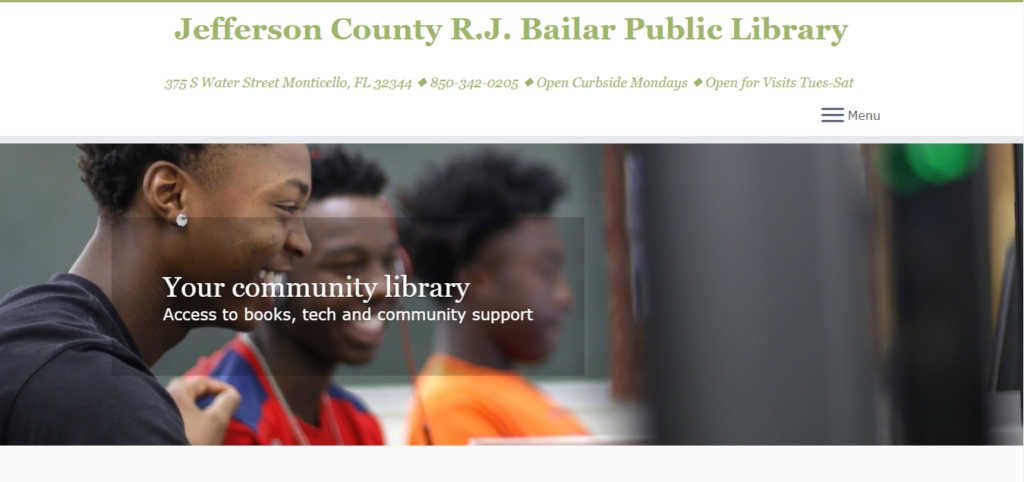
As we explored the pages, we noticed a variety of heuristic violations, particularly with the main catalog home page, so we plan to pay particular attention to the way that the home page does (and does not) assist the user with learning the website and finding what they need quickly and easily. We are also most interested in exploring The Jefferson County R.J. Bailar Public Library (JCPL) website more, as it was the most sparse and frustrating to navigate of the three Wilderness Coast library websites.

Jefferson County Public Library site

Persona

A student at Jefferson County High School unfamiliar with their local library and its services. They are preparing to apply to colleges and are working to keep a high GPA and an impressive set of extracurriculars. At home the family owns only one computer and they have multiple younger siblings, creating a need for somewhere quiet and available to work for longer hours on their final projects for classes. They have been assigned a research paper for their junior year history class and need to do research on a specific topic.

We chose this persona because for our tasks it made most sense for a student very focused on their upcoming assignments to need the services of the library. It also allowed us to explore more uses for the library beyond only finding an available book or two. Now in addition to that we can include the search for research tools like computers and printers.

Scenario

The high school student is trying to use their local library system to conduct research on a paper they have been assigned. The topic they are researching is the Ides of March and the death of Julius Caesar. The student will also look for activities and events that will help them become more engaged in their local library’s events to complete service hour requirements.

Tasks

Task 1

Using the Library system, the student will locate a relevant book for their research on the death of Julius Caesar, and which library that book is located at.

This particular task prompts our users to search for a specific set of books in the system, allowing us to observe the user refining their searches and exploring a couple of options much like our student persona would as they search for relevant materials. It also makes note of the availability of that book to the library near our persona’s county.

Task 2

Now knowing what book to look for and what library it is at, the student will look for the available hours of that library that does not overlap with their high school schedule.

This task forces our user to backtrack and return to the main page of the site to locate the hours of that library, not only refining their knowledge for the next task of additional services but also allowing us to observe how easy or difficult it is to backtrack on the website through its multiple links.

Task 3

Find information on the use of computers at the local library to complete their research paper on Julius Caesar’s death. The student will also find out how to print from the library. 

Finally, this task focuses on the persona’s need for extra services from the library and prompts our user to search for available tools on that library website, which in some cases isn’t in any familiar location to the user on the site and pushes them to search around a bit for this information. We as observers will be able to see if this additional search will stump any users now that they have gone across the site a bit already.

INDIVIDUAL ASSIGNMENT 2: HEURISTIC EVALUATION

Introduction

The website I would like to analyze for my heuristic evaluation is SarahMaker.com( https://sarahmaker.com/). SarahMaker.com is an educational website that features classes, articles, patterns, and premium video to help you learn a craft of your choice. Their scope of subject is large and includes, fabric crafts, needle arts, sewing, sculpting, and more. The website includes both free and premium paid content. I say that this is a great website for a beginner crafter in any medium. Crafting, or creating in general, can seem daunting and easily susceptible to information overload, but I Sarah has done her best to create a clean and professional appearance for her website.

Scenario               

My scenario features a young woman enamored with the Pinterest articles, Tik Toks, Facebook Reels and Instagram-worthy photos she sees of her friends and family showcasing their latest needlework creations. She’s been saying she would eventually teach herself to crochet for years, but other priorities have hindered her from starting. She now has the free time to dedicate learning to crochet. With the low financial commitment and abundance of accessibility to resources on how to crochet, the barrier of entry was very low. A friend recommended YouTube to learn basic stitches and SarahMaker.com for pattern ideas. YouTube is great, but she prefers the mental freedom of written instructions.

Heuristic Analysis       

With my scenario and persona in mind, I took to Sarahmaker.com to see what they offer in the realm of crochet. I personally, keep the Ad Blocker plugin enabled on Google Chrome, and one think I did notice was the unusual amount of empty space the site had. This is usually a tell-tale sign that this site might have many ads going on. I took the chance, and temporarily turned off Ad Blocker for the website and I was right. There were ads all along the bottom portion of the screen. I know many are divided on the necessity of ads on websites, but strictly speaking from a user’s point of view, ads are the worst. I would place this in violation of rule number 8: Aesthetic and minimalist design. Sarah has, mostly, static content on her website. The only things I see moving are the carousel stuck to the bottom of the screen and the video of ads playing right above it. It’s extremely distracting from an otherwise attractive website.

                I’ve been to Sarah’s website once or twice before at the recommendation of a Google search for some Cricut help. She always gave me very good advice in her articles. I have never gone to the homepage in search of a specific subject. Following my scenario though, I noticed locating the crochet section was very easy to find right at the top navigation of the page. However, the main crochet page opens to a wall of text, that I immediately skip, to go to what I believe are the lessons or beginner content separated into sections (or cards) below. These are all sponsored ads for crochet pattern packs. That’s not going to be very beneficial to someone who is a complete beginner. The stitch tutorials for beginners are found in a link in the middle of the wall of text I’ve already skipped over. The links are also a muted shade of green that is very similar to the color of the basic text. I think this is a violation of rule number 7: Flexibility and efficiency of use.

Proposed Solutions            

A few adjustments I propose to combat these issues are, trying to find a different way to monetize the website without distracting ads.  Offering other paid content or place some premium content behind a subscription wall. I see Sara has hundreds of patterns. Having the patterns available to purchase at a very low price is something to consider. Considering the placement of the ads, they are even breaking the flow of the page with the video ads toward the bottom stretching into the footer content. As for making beginner content easier to locate, I would recommend placing links to the beginner’s content much closer to the top. I would even go as far as adding sub-menus to the top navigation menus. I’d also like to see a greater contrast in the color of general text and text that are links. I see, Sarah is trying to stay within a certain color scheme, but links are vital to the navigation of the site. They need to be more noticeable than they are now. If the user is utilizing breadcrumbs, they need to display more than two locations for every page a user visits. As the site stands now, the main page “Home”, leads to “Blog” on every page. This is confusing for a user and does not give a concrete path back to where they’ve already been. Overall, I feel someone that is well-versed in using the internet would be able to use this website with few problems, but frustrations can appear with some of the questionable navigation choices and advertisement placement.

GROUP ASSIGNMENT 2: USER SCENARIOS AND REPRESENTATIVE TASKS 

Group Name: Eager Explorers 

Group Members: Gina Gatti, Andrew Martin, Isabella Restrepo, Meagan Russell, Marinel Stancu, Paul Kwek 

Selected website: TripAdvisor 

We have selected TripAdvisor, which is a travel information and booking site. It provides information, reviews, and photos on hotels and transportation from user-generated content. Users can book lodging, transportation and make reservations at restaurants. In addition to travel accommodation, it also provides information on attractions and things to do on trips.  

User profile / persona created  

The user is a married 42-year-old mother from the Miami, Florida area. She is college educated with a bachelor’s in science in Marketing and serves as the Marketing Director at a midsize accounting firm. She is trying to plan a vacation for her family of 5 and wants to stay relatively close to the United States. She and her spouse have three children, a girl that is 12 and two boys that are 9 and 5 years old. The entire family has valid United States Passports and have traveled internationally in the past. This family goes on a trip annually, however, this year they are a bit more budget conscience, given the economic challenges with inflation. They are looking for good deals that will maximize their vacation without breaking the bank! The user has experience with other travel sites and is comfortable using technology in her daily life. 

Scenario developed  

For their trip next year, they wanted to go on a cruise. So, the mother is trying to check on TripAdvisor for a cruise that will match their budget ($400 per person) and availability. The user prefers leaving from a Miami port, however, would be open to leaving from another port in Florida if the price savings were significant. Additionally, since she has 3 children in school, the timing of the trip should not interfere with this program, and she would prefer not to travel in the Caribbean during the most active part of the hurricane season (e.g., September – October). 

Specific tasks developed 

* First task is to find a cruise when the kids are on break from school and taking in consideration of hurricane season and to stay within the vacation budget.  

We selected this task to assess how the user would address this task and what logical path they would take. We are curious to see how they would start their search, if it is by date, pricing, or both to see what they prioritize first.  

* Second task is to pick a cruise that stops in multiple ports. 

We selected this task to assess how the user would filter their search results by stops. The user could filter by “Cruise length” or they could select specific ports they would like to travel to. It also shows where it will be embarking from. Overall, it would show which approach is easiest or accommodating for the user in their search.  

 * Third task is to figure out what activities are offered at the different cruise stops. 

We selected this task to assess how the user would search for activities at the different cruise stops. We are curious to see if the user will search using the general search bar or click on the “Things to Do” search. The user could also explore the website and search based off interests (e.g., “Outdoors”, “Food and drink”, “Arts and culture”, “By the water”) which is a different search option. 

Word Count: 531

Group Assignment 2: Museum Website Persona and Future Tasks

Chosen Website

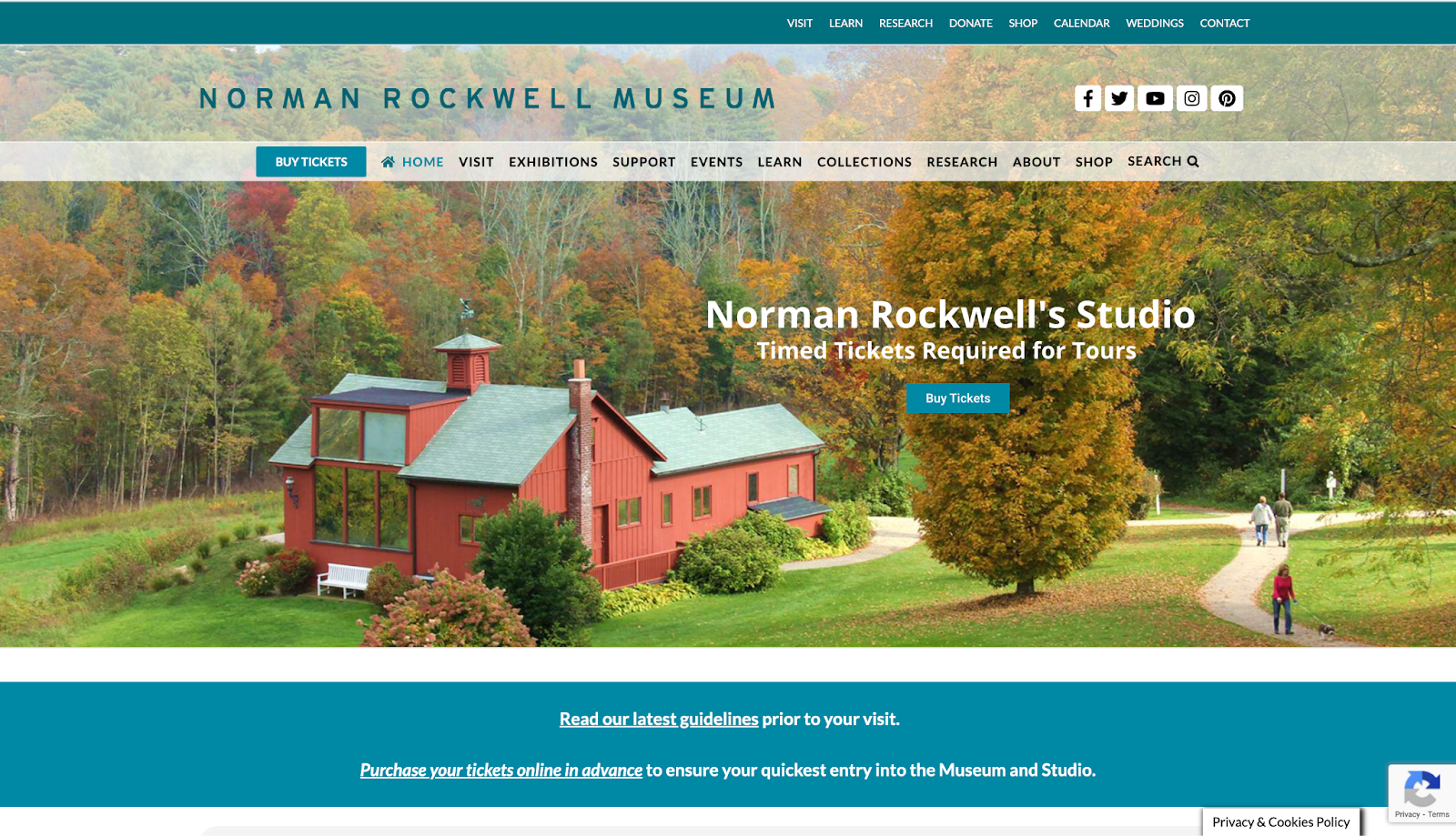
We have chosen the Norman Rockwell Museum to analyze for the rest of the course (https://www.nrm.org/). We chose this site because of the many issues we noticed, hoping to figure out possible suggestions as to how to fix it. After looking at the website as a group, we decided to focus on the sections that include its collection/research resources, open careers, and exhibits. All of these sections have issues and usability violations of varying degrees, and we believe that it would be helpful to look at sections with clear usability issues to deepen our understanding about the class material as well as help us understand how to apply what we’ve learned to real life.

User Profile/Persona

The type of people who would potentially use this website are those who are interested in the museum’s collections, interested in going to visit the museum, interested in going to the museum’s events, and/or interested in donating/giving back to the museum. In order to analyze this website through the lens of someone who fits these criteria, we have developed a persona. After deliberation, we created a persona that is an art history student potentially interested in getting an internship at this museum. 

Scenario

We developed a scenario to help guide us in figuring out how our persona might interact with this website. Based on both the general persona we created and the overall type of people who visit this website, the scenario we created for our persona is:

Cameron is an undergraduate art history student at a local university. They became interested in Normal Rockwell’s works after attending a class that included these works. Cameron looked online to try and find more of these works, and ended up stumbling upon the Norman Rockwell Museum’s website. After looking around, they are interested in visiting the museum and, as they need an internship before they graduate from their program, would love to also intern at this museum as well. However, they are having some trouble navigating this museum’s website.

Through the use of this scenario, we are then able to develop tasks that a person like our persona, Cameron, would complete on this website. We expect Cameron to initially make use of the common search function on the main page of the site to find out more information on a certain collection. We also expect Cameron to navigate the third-party purchasing widget in hopes of purchasing their ticket. In performing these tasks, Cameron will have to explore alternative methods of accomplishing their tasks. 

Developed Tasks

For the future user tests that we will be completing individually, we have developed three tasks for our test users. The first task is to plan a visit to the museum by finding out how to buy a ticket and how to get to the museum. This is the most likely task a person going to this website might complete as many people who visit a website for a museum are looking to visit the museum itself as well. The second task is to find out if any internship opportunities are open and the details about the internship as well as someone like Cameron would look for career opportunities in this way. The third task is for the user to find a specific work called “Pointing Hand” in the Norman Rockwell Museum’s digital collections. A student like Cameron might hope to learn more about the museum, how an internship at the NRM can benefit their career, and if “Pointing Hand” would be a good candidate to do an assignment on. Therefore, using these types of tasks in our user tests might show us how someone might actually use the website.

Individual Assignment 2: Heuristic Evaluation

Website Being Evaluated

This image has an empty alt attribute; its file name is 1135C61E-4FCC-4161-B0C7-738C8FC5DB0C-1024x640.jpeg


Site Background

The site that I chose to complete my heuristic analysis assignment on is the health site used and operated by the state of Florida for up-to-date health information, floridahealth.gov. This site provides health information to Floridians that reside within the state and out of state so that they may obtain health information, statistics, and updates of the state of Florida to make informed health decisions.

Heuristic Analysis Simulation situation

The simulation chosen for the floridahealth.gov was one of a user seeking the most up to date information on the COVID-19 to make an informed decision on whether to get the COVID-19 vaccine for protection against the virus. This simulation was based off a user that mostly seeks after information using social media mostly without verifying the information received from social media during every encounter of the posts that comes across to the user. This simulation was used in a manner of the user not being very advanced in information seeking, usability analysis, or information seeking practices; we can identify the user in this simulation as a beginner as they navigate the Florida Health site.

Heuristic Analysis 10 step checklist

Heuristic Analysis Steps |Not Met Achieved| Comments
#1. Visibility of system status: The design should always keep users informed about what is going on, through appropriate feedback within a reasonable amount of time.


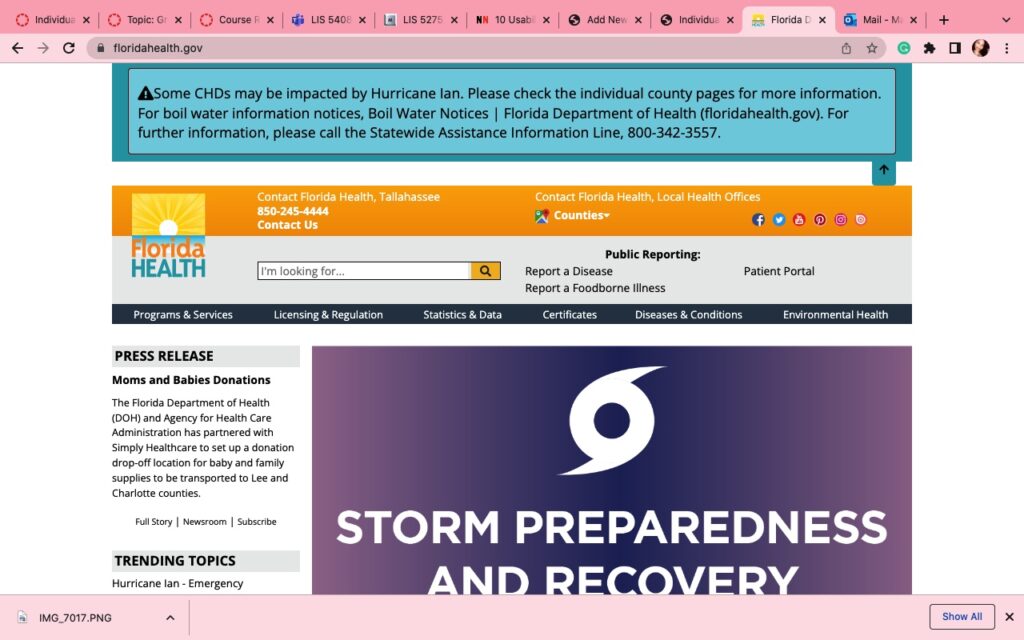
XThe site does not give users much information what they are doing, there is a search both atop the site that indicates “I’m looking for” which can be frustrating to use since the text indicator of “I” does not show in the search box as the search box only shows the texts that are typed once typing begins but there is no indication to show that text input can be started. 
#2. Match between system and the real world: The design should speak the users’ language. Use words, phrases, and concepts familiar to the user, rather than internal jargon. Follow real-world conventions, making information appear in a natural and logical order.XThe site uses the user’s language clearly but the updates are not in real time as shown on the yielded search results, the last updated article “The State of Florida Issues COVID-19 Updates” after being clicked shows as August 7, 2020 which is over two years ago. 
#3. User control and freedom: Users often perform actions by mistake. They need a clearly marked “emergency exit” to leave the unwanted action without having to go through an extended process.


XThe user control is limited to return to the previous page the back arrow in inactive so to allow going back the user must select the previous tab they were on shown to the left of the new tab that was opened. It is a very limited system. 
#4. Consistency and standards: Users should not have to wonder whether different words, situations, or actions mean the same thing. Follow platform and industry conventions.XThe articles presented upon search submission are not well organized at all. 
#5. Error prevention: Good error messages are important, but the best designs carefully prevent problems from occurring in the first place. Either eliminate error-prone conditions, or check for them and present users with a confirmation option before they commit to the action.

XThe opening of the new tab causing the back arrow to be disabled allows limit of error and error prevention because multiple tabs can be opened and navigated through which is helpful for information comparison by an expert of information seeking but not an information seeking beginner. 
#6. Recognition rather than call: Minimize the user’s memory load by making elements, actions, and options visible. The user should not have to remember information from one part of the interface to another. Information required to use the design (e.g. field labels or menu items) should be visible or easily retrievable when needed.

XThe opening of the new tab causing the back arrow to be disabled allows limit of error and error prevention, and recognition rather than recall because multiple tabs can be opened and navigated through which is helpful for information comparison by an expert of information seeking but not an information seeking beginner. 
#7. Flexibility and efficiency of use: Shortcuts — hidden from novice users — may speed up the interaction for the expert user such that the design can cater to both inexperienced and experienced users. Allow users to tailor frequent actions.XThe site is friendly for beginners with the search bar being easily found on the first page and topic widgets sectioning information can also be clearly seen. The sectioning of information is not easily found however by a beginner.
#8. Aesthetic and minimalist design: Interfaces should not contain information that is irrelevant or rarely needed. Every extra unit of information in an interface competes with the relevant units of information and diminishes their relative visibility.

XThe design of the site is very simple and does meet the design metrics for older adults through navigation being easily accessible by means of all of the information being on one page that only requires scrolling down to see. 
#9. Help users recognize, diagnose, and recover from errors: Error messages should be expressed in plain language (no error codes), precisely indicate the problem, and constructively suggest a solution.XThis step is met because there is not an easily made method to invoke error during a search on this site. 
#10. Help and documentation: It’s best if the system doesn’t need any additional explanation. However, it may be necessary to provide documentation to help users understand how to complete their tasks.XThe site does not provide documentation to help users complete their tasks it simply provides a question and answer from multiple article method. 


LIS5765_MarsAlceus_HeuristicAnalysis1-1

Design Recommendations

The site has many features that could be improved however two recommendation that I could immediately consider for user experience are that the search results be yielded in a more organized manner to filter the topics prior to receiving the search results. The second recommendation is that the information yielded in the search results be filtered by most recent to later in date while providing a brief synopsis of what the article includes instead of just showing the article title.

Individual Assignment 2: Heuristic Evaluation

Website Being Evaluated

This image has an empty alt attribute; its file name is 1135C61E-4FCC-4161-B0C7-738C8FC5DB0C-1024x640.jpeg


Site Background

The site that I chose to complete my heuristic analysis assignment on is the health site used and operated by the state of Florida for up-to-date health information, floridahealth.gov. This site provides health information to Floridians that reside within the state and out of state so that they may obtain health information, statistics, and updates of the state of Florida to make informed health decisions.

Heuristic Analysis Simulation situation

The simulation chosen for the floridahealth.gov was one of a user seeking the most up to date information on the COVID-19 to make an informed decision on whether to get the COVID-19 vaccine for protection against the virus. This simulation was based off a user that mostly seeks after information using social media mostly without verifying the information received from social media during every encounter of the posts that comes across to the user. This simulation was used in a manner of the user not being very advanced in information seeking, usability analysis, or information seeking practices; we can identify the user in this simulation as a beginner as they navigate the Florida Health site.

Heuristic Analysis 10 step checklist

Heuristic Analysis Steps |Not Met Achieved| Comments
#1. Visibility of system status: The design should always keep users informed about what is going on, through appropriate feedback within a reasonable amount of time.


XThe site does not give users much information what they are doing, there is a search both atop the site that indicates “I’m looking for” which can be frustrating to use since the text indicator of “I” does not show in the search box as the search box only shows the texts that are typed once typing begins but there is no indication to show that text input can be started. 
#2. Match between system and the real world: The design should speak the users’ language. Use words, phrases, and concepts familiar to the user, rather than internal jargon. Follow real-world conventions, making information appear in a natural and logical order.XThe site uses the user’s language clearly but the updates are not in real time as shown on the yielded search results, the last updated article “The State of Florida Issues COVID-19 Updates” after being clicked shows as August 7, 2020 which is over two years ago. 
#3. User control and freedom: Users often perform actions by mistake. They need a clearly marked “emergency exit” to leave the unwanted action without having to go through an extended process.


XThe user control is limited to return to the previous page the back arrow in inactive so to allow going back the user must select the previous tab they were on shown to the left of the new tab that was opened. It is a very limited system. 
#4. Consistency and standards: Users should not have to wonder whether different words, situations, or actions mean the same thing. Follow platform and industry conventions.XThe articles presented upon search submission are not well organized at all. 
#5. Error prevention: Good error messages are important, but the best designs carefully prevent problems from occurring in the first place. Either eliminate error-prone conditions, or check for them and present users with a confirmation option before they commit to the action.

XThe opening of the new tab causing the back arrow to be disabled allows limit of error and error prevention because multiple tabs can be opened and navigated through which is helpful for information comparison by an expert of information seeking but not an information seeking beginner. 
#6. Recognition rather than call: Minimize the user’s memory load by making elements, actions, and options visible. The user should not have to remember information from one part of the interface to another. Information required to use the design (e.g. field labels or menu items) should be visible or easily retrievable when needed.

XThe opening of the new tab causing the back arrow to be disabled allows limit of error and error prevention, and recognition rather than recall because multiple tabs can be opened and navigated through which is helpful for information comparison by an expert of information seeking but not an information seeking beginner. 
#7. Flexibility and efficiency of use: Shortcuts — hidden from novice users — may speed up the interaction for the expert user such that the design can cater to both inexperienced and experienced users. Allow users to tailor frequent actions.XThe site is friendly for beginners with the search bar being easily found on the first page and topic widgets sectioning information can also be clearly seen. The sectioning of information is not easily found however by a beginner.
#8. Aesthetic and minimalist design: Interfaces should not contain information that is irrelevant or rarely needed. Every extra unit of information in an interface competes with the relevant units of information and diminishes their relative visibility.

XThe design of the site is very simple and does meet the design metrics for older adults through navigation being easily accessible by means of all of the information being on one page that only requires scrolling down to see. 
#9. Help users recognize, diagnose, and recover from errors: Error messages should be expressed in plain language (no error codes), precisely indicate the problem, and constructively suggest a solution.XThis step is met because there is not an easily made method to invoke error during a search on this site. 
#10. Help and documentation: It’s best if the system doesn’t need any additional explanation. However, it may be necessary to provide documentation to help users understand how to complete their tasks.XThe site does not provide documentation to help users complete their tasks it simply provides a question and answer from multiple article method. 


LIS5765_MarsAlceus_HeuristicAnalysis1-1

Download

Design Recommendations

The site has many features that could be improved however two recommendation that I could immediately consider for user experience are that the search results be yielded in a more organized manner to filter the topics prior to receiving the search results. The second recommendation is that the information yielded in the search results be filtered by most recent to later in date while providing a brief synopsis of what the article includes instead of just showing the article title.

Individual Assignment 2: Heuristic Evaluation

Website Being Evaluated

https://www.floridahealth.gov/

Site Background

The site that I chose to complete my heuristic analysis assignment on is the health site used and operated by the state of Florida for up-to-date health information, floridahealth.gov. This site provides health information to Floridians that reside within the state and out of state so that they may obtain health information, statistics, and updates of the state of Florida to make informed health decisions.

Heuristic Analysis Simulation situation

The simulation chosen for the floridahealth.gov was one of a user seeking the most up to date information on the COVID-19 to make an informed decision on whether to get the COVID-19 vaccine for protection against the virus. This simulation was based off a user that mostly seeks after information using social media mostly without verifying the information received from social media during every encounter of the posts that comes across to the user. This simulation was used in a manner of the user not being very advanced in information seeking, usability analysis, or information seeking practices; we can identify the user in this simulation as a beginner as they navigate the Florida Health site.

Heuristic Analysis 10 step checklist

Heuristic Analysis Steps |Not Met Achieved| Comments
#1. Visibility of system status: The design should always keep users informed about what is going on, through appropriate feedback within a reasonable amount of time.

XThe site does not give users much information what they are doing, there is a search both atop the site that indicates “I’m looking for” which can be frustrating to use since the text indicator of “I” does not show in the search box as the search box only shows the texts that are typed once typing begins but there is no indication to show that text input can be started. 
#2. Match between system and the real world: The design should speak the users’ language. Use words, phrases, and concepts familiar to the user, rather than internal jargon. Follow real-world conventions, making information appear in a natural and logical order.XThe site uses the user’s language clearly but the updates are not in real time as shown on the yielded search results, the last updated article “The State of Florida Issues COVID-19 Updates” after being clicked shows as August 7, 2020 which is over two years ago. 
#3. User control and freedom: Users often perform actions by mistake. They need a clearly marked “emergency exit” to leave the unwanted action without having to go through an extended process.

XThe user control is limited to return to the previous page the back arrow in inactive so to allow going back the user must select the previous tab they were on shown to the left of the new tab that was opened. It is a very limited system. 
#4. Consistency and standards: Users should not have to wonder whether different words, situations, or actions mean the same thing. Follow platform and industry conventions.XThe articles presented upon search submission are not well organized at all. 
#5. Error prevention: Good error messages are important, but the best designs carefully prevent problems from occurring in the first place. Either eliminate error-prone conditions, or check for them and present users with a confirmation option before they commit to the action.
XThe opening of the new tab causing the back arrow to be disabled allows limit of error and error prevention because multiple tabs can be opened and navigated through which is helpful for information comparison by an expert of information seeking but not an information seeking beginner. 
#6. Recognition rather than call: Minimize the user’s memory load by making elements, actions, and options visible. The user should not have to remember information from one part of the interface to another. Information required to use the design (e.g. field labels or menu items) should be visible or easily retrievable when needed.
XThe opening of the new tab causing the back arrow to be disabled allows limit of error and error prevention, and recognition rather than recall because multiple tabs can be opened and navigated through which is helpful for information comparison by an expert of information seeking but not an information seeking beginner. 
#7. Flexibility and efficiency of use: Shortcuts — hidden from novice users — may speed up the interaction for the expert user such that the design can cater to both inexperienced and experienced users. Allow users to tailor frequent actions.XThe site is friendly for beginners with the search bar being easily found on the first page and topic widgets sectioning information can also be clearly seen. The sectioning of information is not easily found however by a beginner.
#8. Aesthetic and minimalist design: Interfaces should not contain information that is irrelevant or rarely needed. Every extra unit of information in an interface competes with the relevant units of information and diminishes their relative visibility.
XThe design of the site is very simple and does meet the design metrics for older adults through navigation being easily accessible by means of all of the information being on one page that only requires scrolling down to see. 
#9. Help users recognize, diagnose, and recover from errors: Error messages should be expressed in plain language (no error codes), precisely indicate the problem, and constructively suggest a solution.XThis step is met because there is not an easily made method to invoke error during a search on this site. 
#10. Help and documentation: It’s best if the system doesn’t need any additional explanation. However, it may be necessary to provide documentation to help users understand how to complete their tasks.XThe site does not provide documentation to help users complete their tasks it simply provides a question and answer from multiple article method. 

Design Recommendations

The site has many features that could be improved however two recommendation that I could immediately consider for user experience are that the search results be yielded in a more organized manner to filter the topics prior to receiving the search results. The second recommendation is that the information yielded in the search results be filtered by most recent to later in date while providing a brief synopsis of what the article includes instead of just showing the article title.

What Are Index Futures? Definition, Types, and How to Profit

what is index trading

Some brokers also allow you to purchase fractional shares, which means you can buy a portion of a share if you can’t afford the full share price. Pick one with the terms and tools that best align with your investing style and experience. A priority for active traders will be low commissions and fast order execution for time-sensitive trades.

With smaller indexes like the S&P 500, the fund manager will typically hold the same stocks in the same proportions as the underlying index. For instance, if the S&P 500 is 7% Apple stock, an S&P 500 index fund will hold roughly 7% Apple stock. – tracking the performance of a group of stocks may be more volatile than individual stocks. This means there is potential for more significant losses and more enormous profits. New traders should look for a broker who can teach them the tools of the trade. Some offer educational articles, online tutorials and in-person seminars.

Regardless of strategy, trading on an index reduces the risk and expenses incurred by trading individual stocks, and it also results in a more diversified portfolio with less volatile price changes. Since many of the major stock indices are reliable predictors of both domestic and global economies, traders can use effective index trading tactics to gain a competitive edge. Trading index futures and options can be more suitable than cash products for a longer-term position, as they have wider spreads, but they still include the overnight fees. Index futures are derivative products based on the value traders expect the index to reach in the future. At expiry, you can settle the futures contract for cash, or roll it forward into the next period and continue to hold. The share prices of all the constituents were totalled and divided by the number of companies.

  • This method gives greater weighting to larger cap companies, which means their performance will affect an index’s value more than lower cap companies.
  • An unweighted or equal-weighted index will give the same weight to each and every constituent company.
  • You can take a position on index futures with CFDs, and they will be traded at the futures price – meaning that you won’t incur overnight funding charges.
  • The S&P 500 is one of the most widely traded indices in the world and is considered a benchmark for the US economy, as well as the global economy.

If an investor wanted to do that, it would have meant buying every stock in equal weighting. It wasn’t until the first financial derivatives in the 1970s and the advent of stock index futures that trading an index became possible. Index funds and ETFs are baskets of stocks that offer other securities that you can invest in all at once. These funds will track the entirety of the S&P 500, and they’ll likely perform similar to how the index itself performs. And rather than buying individual stocks to mimic the S&P 500, you can invest in a fund that just does the entire thing for you all in one investment.

Please ensure you understand how this product works and whether you can afford to take the high risk of losing money. That’s because their prices https://bigbostrade.com/ depend on the prices of the underlying index. The risk comes from speculative positions taken by investors who use leverage to make their trades.

It covers 30 prominent companies listed on stock exchanges in the United States, and unlike many of its other peers, it does not use a weighted average. The use of price-weighted measurements ignores volume and focuses solely on price, adding more weight to those companies that are more expensive than others. The most important thing to pay attention to is that they have volatility and liquidity. Some indices tend to favor one sector of the economy over another, so understanding the differences will be crucial. Here are some of the leading indices, all of which you can trade at PrimeXBT.

Trade with a trusted Forex broker

For example, the E-mini S&P 500 futures contract, which trades on the Chicago Mercantile Exchange (CME), has a value of $50 times the value of the index. So if the index trades at 3,400 points, the market value of the contract would be 3,400 x $50 or $170,000. Some of the most popular index futures are based on equities, which means investors hedge their bets on the individual index named in the contract. A market index measures the value of a portfolio of holdings with specific market characteristics. Each index has its own methodology which is calculated and maintained by the index provider.

what is index trading

Stock trading is the trading of shares of specific companies at individual prices. Once you buy a stock, it is transferred to you from the seller, and you assume ownership. You should also consider that different indices are traded at separate times, depending on the individual exchange.

Wherever you fall on the investor-trader spectrum, taking things slowly, ignoring ‘hot tips’ and keeping good records can help you do it safely. While most global economies are in a similar period of post-Covid, the macroeconomic and industrial responses are divergent cross-country, and complicate the argument of investing in stock vs indices. Adding complexity to the stock trading vs index trading debate, Andrew Sheets of Morgan Stanley, thinks the index could contract by 5%. In light of expectant deceleration, many analysts believe the question is becoming one less focused on what to invest, but where. In turn, banks and forecasters are still projecting positive returns in the stock market.

IG International Limited receives services from other members of the IG Group including IG Markets Limited. Find out more about a range of markets and test yourself with IG Academy’s online courses. The Dow Jones Industrial Average is the oldest U.S. stock index, as well as the most frequently cited one; however, the S&P 500 represents a larger cross-section of the economy. This will also potentially help you identify the best index to trade at any given time. This will reduce the volatility while also dampening the effect of the sharp rally in each and every stock. This will limit the influence that one stock can have on the overall performance of the index.

In most cases, the relative change of an index is more important than the actual numeric value representing the index. For example, if the FTSE 100 Index is at 6,670.40, that number tells investors the index is nearly seven times its base level of 1,000. However, to assess how the index has changed from the previous day, investors must look at the amount the index has fallen, often expressed as a percentage. Indexes are also created to measure other financial or economic data such as interest rates, inflation, or manufacturing output. Indexes often serve as benchmarks against which to evaluate the performance of a portfolio’s returns. One popular investment strategy, known as indexing, is to try to replicate such an index in a passive manner rather than trying to outperform it.

How does index trading compare to stock trading?

Portfolio managers often buy equity index futures as a hedge against potential losses. If the manager has positions in a large number of stocks, index futures can help hedge the risk of declining stock prices by selling equity index futures. Index futures, which are also called stock or equity market index futures, function just like any other futures contract. They give investors the power and obligation to deliver the cash value of the contract based on an underlying index at a specified future date at an agreed-upon price.

The best time to trade an index will depend on the assets it covers, where it is based and the trading hours for the stock exchange if it’s a stock index. It will also depend on market drivers such as company announcements, economic news and political events, which can all trigger market volatility. Stock indices are calculated in different ways based on cfd trading platform the types of companies they track and the goals of the index. Some index calculations give more weight to stocks with higher prices, while others base the weighting on market capitalisation, and others weigh all constituent stocks equally. The two major formulas used to calculate the value of a weighted index are price weighted and market cap weighted.

Price-weighted indices are less common than those based on market cap. The Dow Jones Industrial Average (US30) in the US and Nikkei 225 are both price-weighted indices. Now that you have set your stops and possibly limit orders, it is time to execute the trade. However, you should monitor your trade from time to time, recognizing whether or not you may wish to add or subtract from the position or adjust your stop-loss or limit orders. Trading a specific share involves a lot more research, as you need to be aware of balance sheet issues, earnings reports, and of course the industry that the company operates in.

Here, they will trade an index-tracking fund or simply a basket of shares instead of simply buying and selling individual company stocks. They are traded on margin, meaning that for a small refundable deposit you can actually control a much larger trading position. You can also profit from both rising (going long) and falling (going short) markets. The S&P 500’s value is calculated based on the market cap of each company, adjusted to consider only the number of shares that are traded publicly. However, each company in the S&P 500 is given a specific weighting obtained by dividing the company’s individual market cap by the S&P 500’s total market cap.

In reference to mortgages, it refers to a benchmark interest rate created by a third party. One of the key reasons why investors use put options for hedging purposes is because of the unpredictable nature of the market. Since index options are tied to their stock indices, there is a huge level of risk in the market.

Open your account. Apply in minutes.

So, if you choose to use an actively managed index fund, make sure the added benefit is worth the higher cost. “The low expense ratio helps to ensure that investors obtain returns very close to that of the underlying index which the fund tracks,” Crowell says. Index funds work by holding all or many of the securities within the benchmark index.

Indices move on a list of different factors, with the most basic one being the earnings of the companies listed. The earnings-per-share, cash flow per share, dividends per share, and a whole litany of other metrics come into the picture. The Dow Jones Industrial Average traces its start back to 1896 and is the second oldest index in the United States. (Second only to the Dowell Jones Transportation Average.) It was created by legendary investor Charles Dowell, editor of the Wall Street Journal.

Indices are a measurement of the price performance of a group of shares from an exchange. For example, the FTSE 100 tracks the 100 largest companies on the London Stock Exchange (LSE). Trading indices enables you to get exposure to an entire economy or sector at once, while only having to open a single position. We want to clarify that IG International does not have an official Line account at this time. We have not established any official presence on Line messaging platform. Therefore, any accounts claiming to represent IG International on Line are unauthorized and should be considered as fake.

How can risk be hedged with stock index futures?

For nearly the last century, the average annual total return of the S&P 500, which includes dividends, has been about 10%, not adjusting for inflation. But this doesn’t mean that you can expect to get a 10% return on your investment in the S&P 500 every single year. Our partners cannot pay us to guarantee favorable reviews of their products or services.

What are the indices in trading?

For instance, traders can invest in the S&P 500 index by purchasing E-mini S&P 500 futures contracts. Investors can also trade futures for the Dow Jones and Nasdaq 100 Index. There are the E-mini Dow and E-mini Nasdaq-100 futures contracts, or their smaller variants the Micro E-mini Dow and Micro E-mini Nasdaq-100. Institutional fund managers use benchmarks as a proxy for a fund’s individual performance.

What affects the price of indices

We also offer nine indices on our options – meaning that you’re more likely to find a market that fits your individual trading style. Alternatively, you can also opt to trade or invest in an index-tracking ETF or shares of companies that are included in your chosen stock index. Before trading, you should always consider whether you understand how leveraged instruments work and whether you can afford to take the high risk of losing your money.

Individual Assignment 2: Heuristic Evaluation

Website

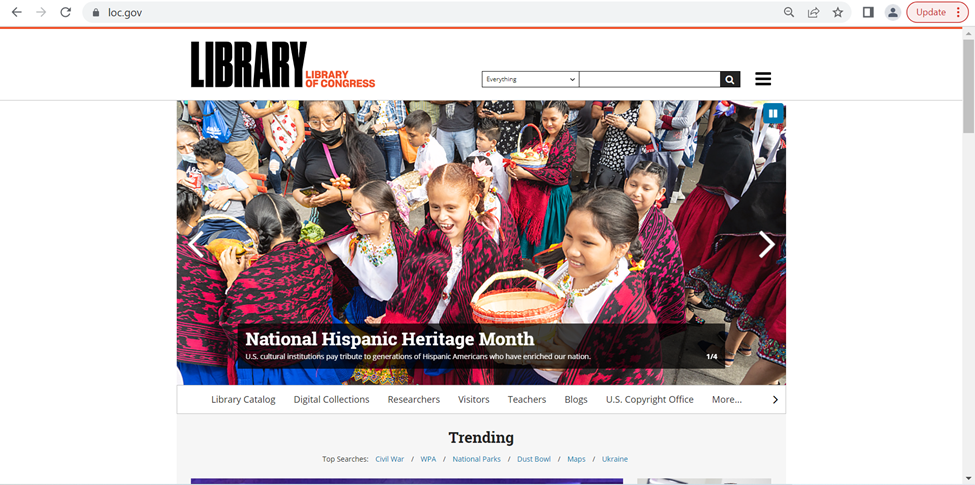
For this assignment, I chose to evaluate the website for the Library of Congress (https://www.loc.gov/) website, which according to its website is “the largest library in the world” and has a collection of more than 173 million items, and it “receives some 15,000 items and adds more than 10,000 items to its collections” each working day. The library not only contains a variety of special collections, with everything from rare books and manuscripts to international collections to photographs and comics.

The Library is not just a place to preserve history (and, indeed, history itself: “it is the oldest federal cultural institution in the nation”), but an active repository that anyone can access for any purpose. With so much to access and so many types of users (from expert researchers and historians to students at every level to a casual reader looking to learn something new), the Library of Congress necessarily must serve as a model for all other libraries to learn from in terms of usability and navigation.

Scenario

The user that I am imagining for this evaluation is an AP US History teacher who wants to assign an essay for students to investigate the Civil Rights Movement, and specifically first-person accounts of the Civil Rights Movement and what it was like to be alive during that time. The teacher plans to require that students use the LoC website to find at least one primary and one secondary source. In order to confidently create this assignment, the teacher wants to create a few sample topics with specific sources for each one, so that during class she can go through the website and take the students through the research process. Tangentially, the teacher is hoping to find resources for teachers and how to use the site in the classroom and/or lesson plans.

Analysis

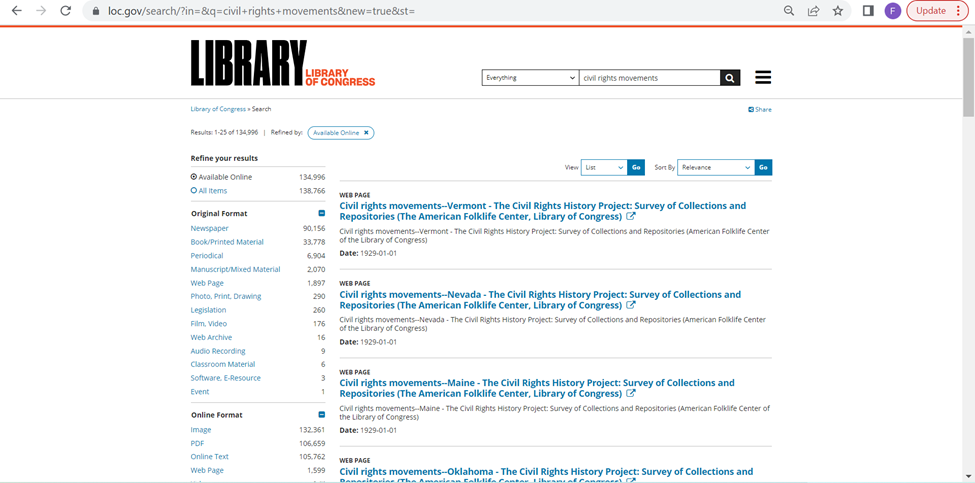
For the first part of my analysis, I started with trying to find resources for teaching the subject in the classroom. Since the teacher wants the essay to be about the topic they are covering, the Civil Rights Movement, they start with searching “civil rights movement” in the search box at the top of the page. This is very easy, and is located in the same place most websites would show a search box, and it quickly returned results. I think the results, however, violate heuristic #8, Aesthetic and minimalist design, because while the page is thankfully sparse in terms of the colors chosen…but the amount of text for each result is overwhelming, especially with the text to the left showing ways to refine the results. I think if this included some kind of corresponding image with each result, so that it is easier to see the delineation between each result, and making the “Refine your results” pane collapsible. It’s not a major faux pas, as far as database search results go, but especially as the largest library in the world, one might expect innovative design for helping increase navigability of their resources.

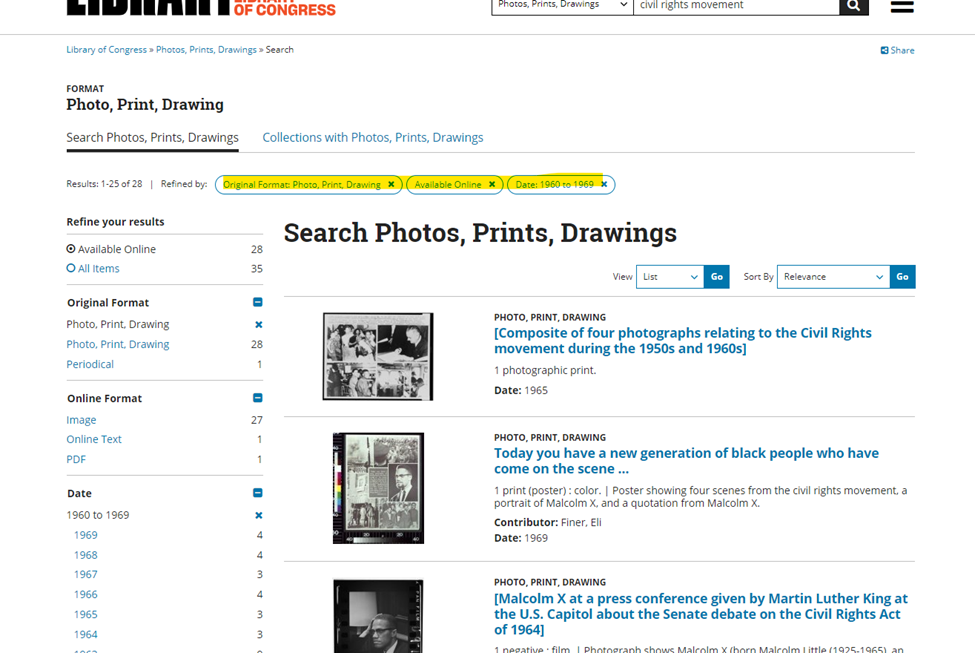
The violation of minimalist design is particularly problematic for this user, since they know that they will have to figure out how to keep 150+ students from immediately giving up due to being overwhelmed. The teacher wants to find ways to minimize the student’s panic, and notices off to the side that they can refine down to only seeing Photos from a specific time period, so the user decides to make the assignment such that the students will choose a relevant photograph to include with their essay, since the results found in this refined search is less visually overwhelming:

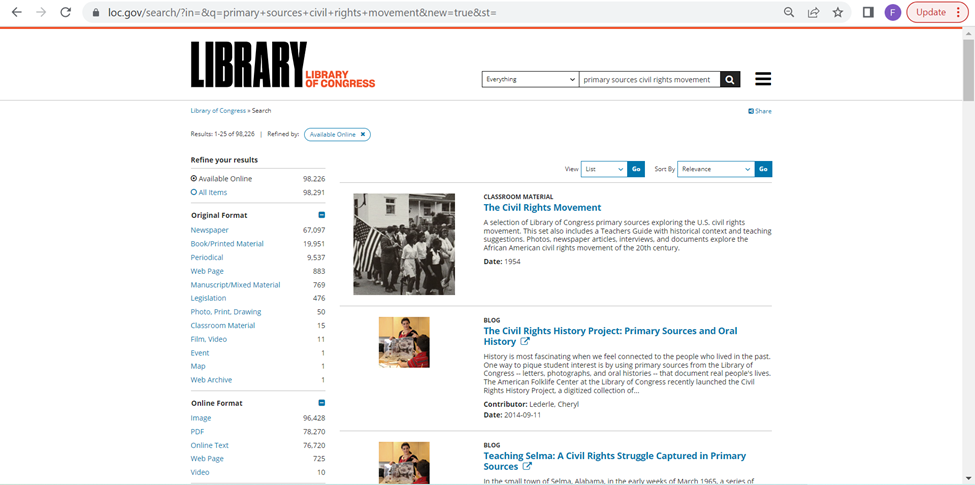
Satisfied with that decision, the teacher decides to try the search bar again to find primary sources. The search is a little better this time around, since it lists specific types of collections at the top of the page of results. The top result is exactly what the teacher is looking for, “Classroom Materials” for the Civil Rights Movement. The teacher hopes this will be a repository of lesson plans, and immediately decides to open it.

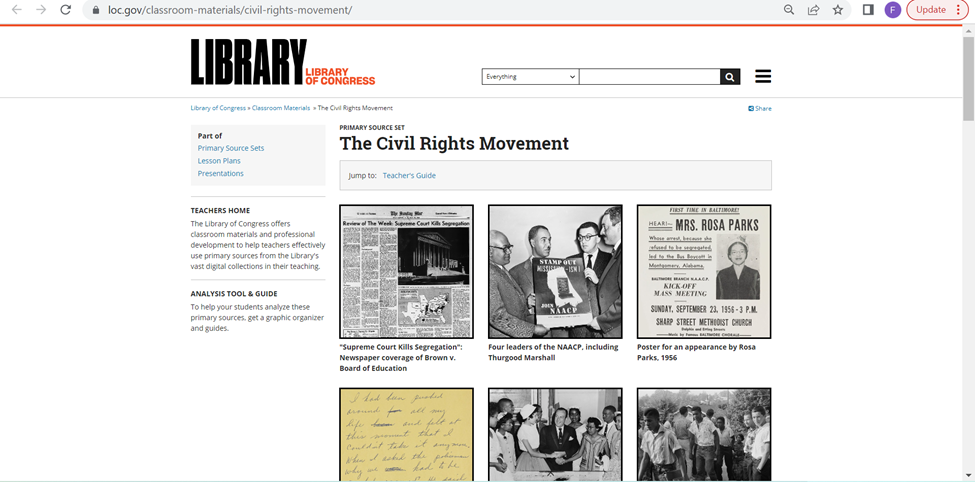
However, while the initial impression seems positive, it quickly becomes clear that this part violates two other heuristics. The first is #7, Flexibility and efficiency of use. The resource is just a collection of images, which while helpful, provide no context for the teacher and requires each one to be opened up individually to review what each resources shows. Additionally, for the background information and Teacher Suggestions are at the bottom, and there is no real indication that you can expect that information beneath all of the photos.

The second issue is a violation of #6, Recognition rather than recall. This is because the user has to open up each resource page to access it, so they have to remember how to return to the landing page in order to continue going through the resources that are collected together. This ends up either being an untenable number of tabs, or a need to make sure not to fall too far down the rabbit hole of hyperlinks and searching, so that you can back out to the landing page after reviewing each source.

While the teacher likes this resource, they want to find an actual lesson plan, because this seemed like a promising resource that did not deliver. So after backing out to try to return to the search page that originally prompted them to find the above resource page. They scroll down and are fortunate to immediately find a Learning Activity Secondary Level – Historical Narrative: The Civil Rights Movement, which is thankfully an easy to use PDF that the teacher decides to print out and peruse later.

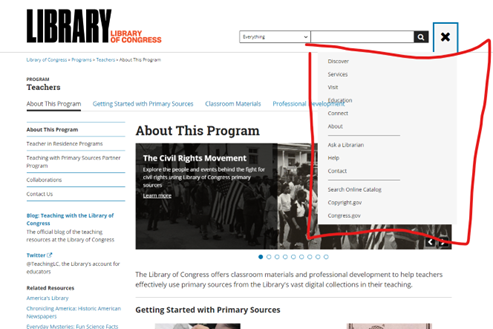
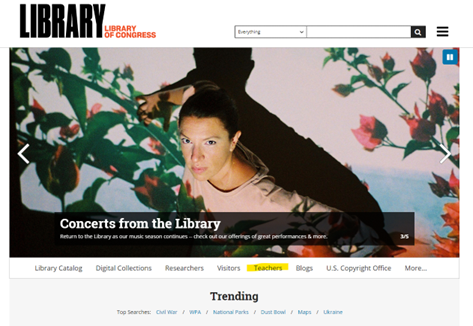
Since they were able to find an actual lesson plan, the user decides to go back to the home page to see if they have dedicated Teacher’s Resources. On the main page’s navigation pane, there is a Teacher tab, although I would argue that this moderately violates the heuristic #4, Consistency and standards, in that the header bar is underneath the carousel image header, which hides it away when most navigation panes would be seen up in the header of the page, and remain consistent throughout the website. The hamburger menu remains static, but does not match up with the header from the main landing page, so finding what you want once you’re within the site is difficult and basically requires backtracking (which violates #7 again).

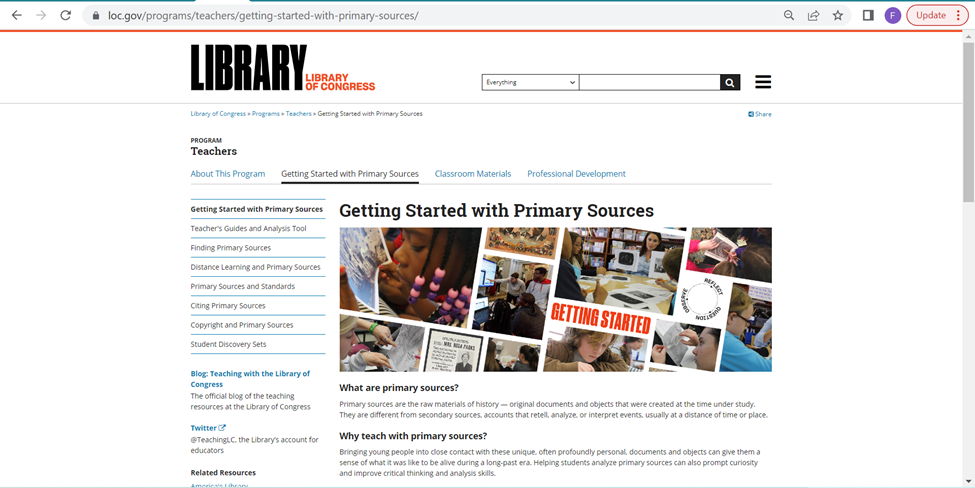
The user is excited to find the resources page, and begins looking at the “Getting Started with Primary Sources” page, and then hopes to partake in the Professional Development options, but struggles to find how to sign up (violating #10: Help and documentation) and decides to try again another time.

Recommendations

Overall, for the world’s largest library website, it does a good job of trying to bracket the information in logical ways. However, for a layperson with a very specific goal (especially one who has to consider a variety of various other users and how they may interact with the site to meet a specific goal), this site is note overly navigable. The biggest issue is how overwhelming it becomes. The violations of minimalist design and efficiency of use are the biggest violations, as users are almost immediately overwhelmed by too much text and having to click to new pages all the time. I think one of the best things they could do is make the search feature more image/collections focused. The Refine Results pane is very helpful, but I think making it collapsible would help a lot in reducing visual clutter and creating more space for better explanations for each material.