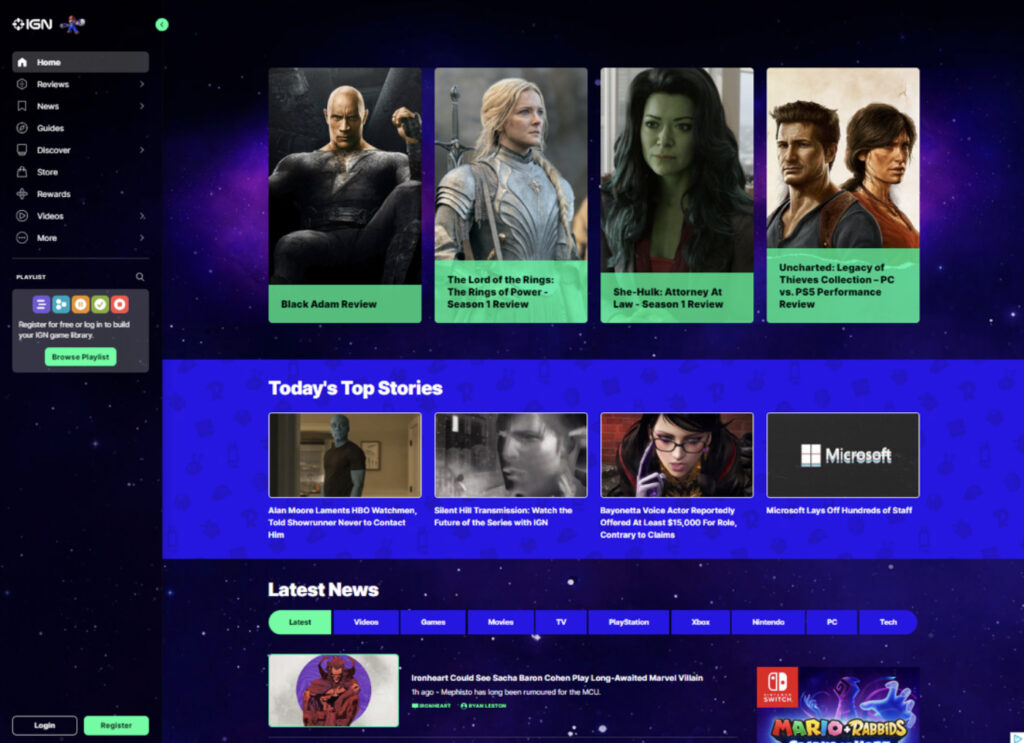
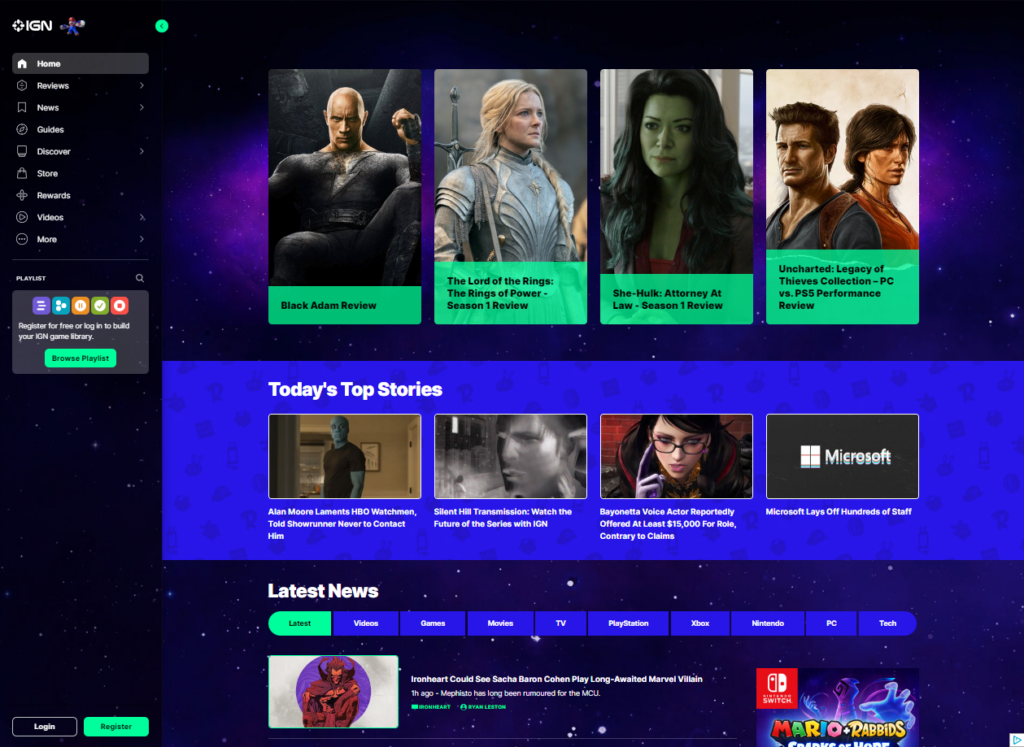
During our group’s individual heuristic analyses (and again in user testing), the most glaring shortcoming on the site was the lack of an obvious search function. There is a natural inclination to look for a search bar or a magnifying glass when trying to locate specific bits of information. At the time of our initial testing neither option existed, as shown in the screen capture below:
Figure 1 – Screen capture from October 18, 2022, prior to Search function being added
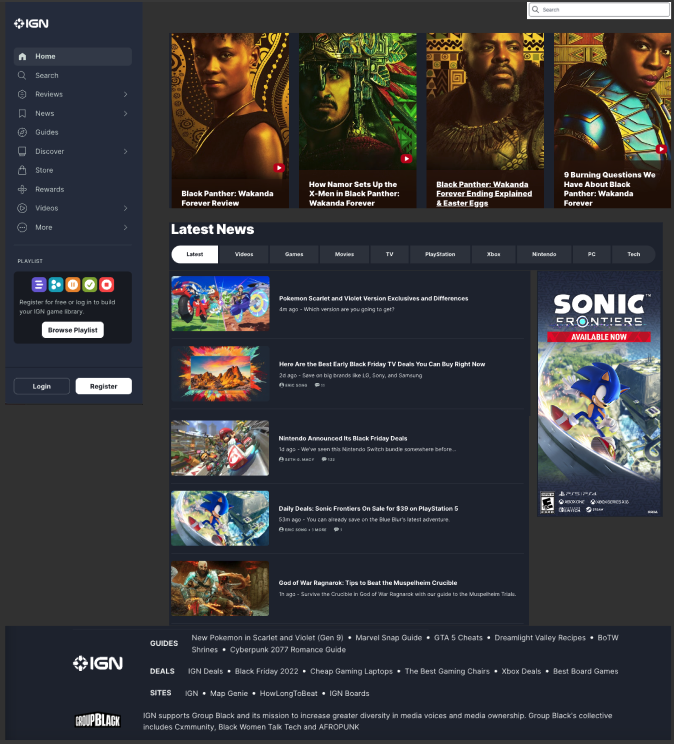
This change was to be our initial iterative change. This change would help the website create a much needed “match between system and real world” as years of using search bars has created an instinctive draw to the search bar and the magnifying glass icon. Since the time of our initial user testing, the website has added a search option. In the earlier screen capture of the website, the column on the left side only showed a magnifying glass icon beside the playlist option. This only allowed for searching of game titles and precompiled “playlists” of articles and reviews.
One of the drawbacks this has on end users is the ability to resurface older content and articles that might be of interest. One of our initial tasks we wanted the end users to complete was finding an article that contained different titles in the Game of the Year catalog for 2021. Due to the limited search functionality of the IGN website, most test and scenarios ended with an overall negative experience for our experimental group due to it being difficult to find the search features, only returning individual games, or returning irrelevant results causing the users to look elsewhere. The site did not really have a way to look through its resources and return specific entities even though we knew it was there. This is one of the main reasons we decided to change the layout and make it easier for users to find the search bar as well as navigate IGN.
Figure 2: Screen capture showing added search option in left hand column (added by website) and a search bar option in the top right (group recommended change)
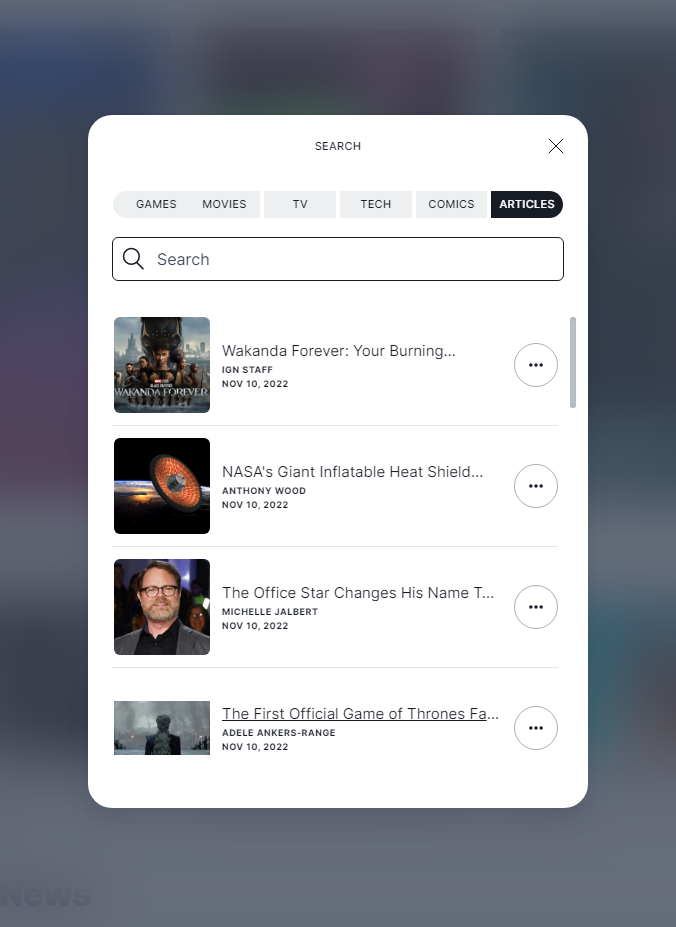
The next screen capture shows the search option after you select it from the main page menu. It offers increased flexibility by allowing the user to search for their keyword in the context of the more popular segments of the page.
Not only have we updated our navigation features, but we’ve also cleaned up the homepage and the cluttering of content. Previously the homepage contained a lot of randomly placed ads that were sometimes inconsistent with the layout of the page, those things such as large images that took up most of the screen. In our revision, we’ve decided to give the site a cleaner look that doesn’t bombard the end user with too much information and allows them to see the main content of the page with the option to navigate elsewhere when effortlessly. This cleaner look also includes the addition of a footer to the home page and the removal of the continuously loading content as the user scrolls the page. We feel the revisions help the user find content and reduces confusion caused by the current site.
Figure 3: Website’s search option, continued.
The website’s recent addition of a search capability shows that our group was on the right track and that the change was an obvious and glaring deficiency in the site’s design.
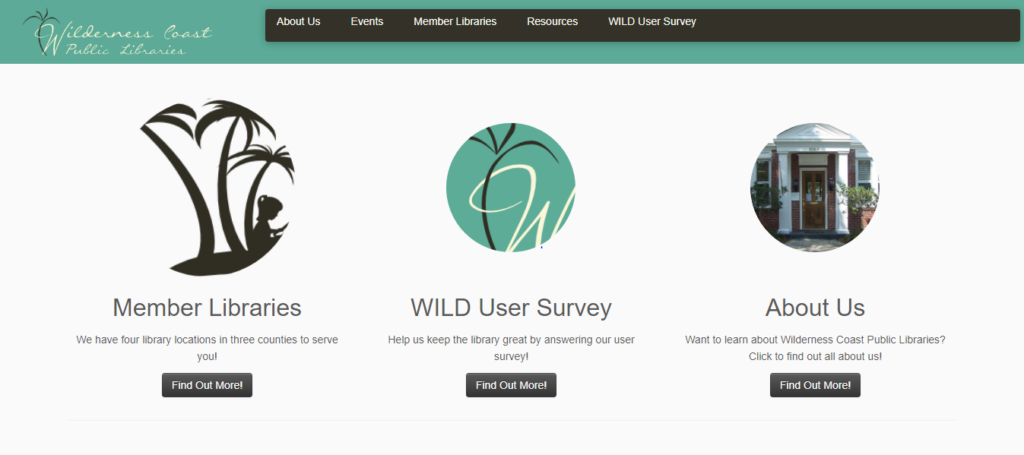
After completing their tasks, our users gave their input on the Wilderness Coast Public Libraries (WCPL) website design, and from their comments, we gathered the following: The look of the site is jumbled and confusing, and the changes in the background from place to place make it seem like each part of the site was made by someone else. Across all the website’s pages, it is clear that the site was improved from a previous WordPress design to look more appealing with pictures and color, but the information itself is still presented in a poor fashion with large blocks of text, tight bullet point lists, and inappropriate links. There is a massive reliance on bullet point lists too close together, images with no links or explanation, a lack of basic information like hours of operation, and the jarring change of designs between each section of the public library system website. Overall, these smaller issues add up to a larger appearance that leaves the user either dreading large amounts of condensed information or confused about where to search.
Some of the pages should be broken up into separate subsections and incorporate either more graphical designs like pictures of the library or simply a more appealing and larger font. A quote from one of our users on this matter was, “Aerial is the most basic of fonts, and everything is so closely spaced.” The links used in the site should be placed in order of most use. Currently, they place the link to the individual library pages on the home screen off to the left and the survey on the library system at the center of the page even though they should prioritize the needs of the users, not the survey.
Improvement suggestions
The WCPL website is confusing and disorganized, as it is a maze of incomplete web pages for each of the different member libraries. When users enter the website, they should be able to get a basic understanding of how to navigate it. The library website would do much better if the links to the library branches were placed on the main page. This would make it easier for users to know which branch they would like to visit. If users want to find a book, the first thing they should consider is a branch of the library they are using.
WCPL site update
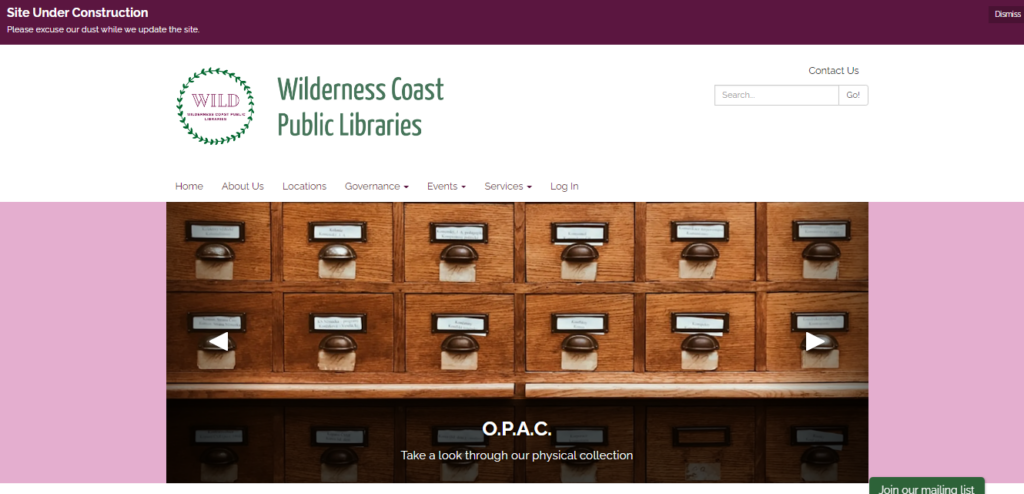
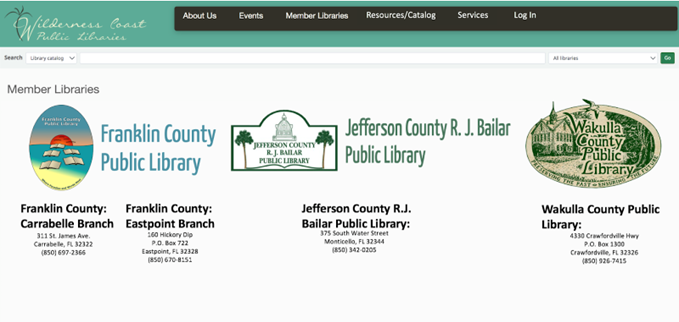
The Wilderness Coast Library System’s shared catalog web page allows a user to view materials offered by the libraries, but the design makes it difficult for users to find the page they want. In each of our individual user tests, our users struggled immediately with how to navigate using the main library system’s landing page, and even when we first chose this site for our project, we knew it left a lot to be desired. In fact, it appears that even the WCPL team noted how frustrating it is for users to navigate through and have thus chosen to begin the process of updating all of the websites. The difference between the two websites can be seen in the images below:
Fig 1. The original landing page for the Wilderness Coast Public Libraries System Fig 2. The updated landing page as of 11/13/2022
As of right now, that overhaul reflects a more modern design approach, utilizing icons below the scrolling header image to provide context for orienting the viewer and assisting with quick navigation. Interestingly, the color palette has also been updated, changing from the teal blue to a green and pink/purple motif. One of the major changes is one our group has complained about from the start of this project: the inclusion of a Search Bar on the landing page (although it is not quite as optimal as we planned to propose). The other major change that they have made thus far is an updated navigation bar that includes actually useful and descriptive titles (with drop down menus for more specificity).
While the decision for the library to begin making updates in the middle of our examination of their site presents some challenges for us as we move forward in this assignment, it also provides a very exciting opportunity as well—as we go through the iterative design process and propose fixes to the site, we can also check in and see the iterative design process that this specific webpage will undergo in the next few weeks as they make their own changes. We will be able to critique not only our own design choices, but also compare them against what the actual library system chooses to do and from there make new proposals for optimizing navigation. This will enrich our experience as we create our proposed designs, and also help give us some direction/parameters as we reflect on the changes that are pushed out by the library. Not only that, but it will be a fertile opportunity to really emphasize the dialogic nature of the iterative design process, as we provide critique of the changes made and offer solutions that we feel would be more optimal, while also giving us a chance to acknowledge areas that may be updated that we hadn’t thought about or considered in our own perusal of the site.
Group redesign
With all of that said, before Wilderness Coast Public Librariesbegan actually publishing changes to their website, we came up with some design recommendations focusing specifically on the main landing page of the site. As I mentioned, some of the biggest concerns we flagged as a team were that: 1) the main page should immediately show a user the different libraries and pertinent information regarding each of them, 2) the main page needs an easy-to-find and easy-to-use catalog search bar, 3) the navigation bar needs to be more descriptive, and 4) the user needs to be able to access this information without having to make so many clicks to new pages.
Group proposed redesign of the WCPL home page
When users first land on the main page of the WCPL system, there is not much to look at. When doing our research up to this point, we all thought the main page could use much work. Mainly, we thought that since the Wilderness County system has multiple branches, and the branches are far apart, the best thing to do would be to have clickable links to each separate library website. Adding the contact information and address under the link would be extra helpful to users to make sure the library they select is the best one for them.
The next biggest issue for the library site is that there was no way to search on the main page. Adding a search bar would be extremely helpful and quicker for users just trying to search the website or the catalog. We added a catalog search bar to the top of the page so that it could be an immediate source of information for library users. The website also had clickable information at the top. Our group thought that adding extra links such as “log in,” “services,” and changing “Resources” to “Resources/Catalog” would be useful.
The search bar that is currently on the catalog page has options to narrow your search to the author, ISBN, subject, title, and more, which is good when searching the catalog. Having more options in regard to the search bar on the main library page would be great for patrons. The edited search bar created gives patrons the option to search the library website, the library catalog, library events, and library databases. Those options give patrons a narrow starting point that they can use to get good use out of the website.
Our group chose to user test and redesign the website Sarah Maker, which is focused on teaching people how to create many different arts and crafts. The persona we chose for our user test was a young woman who wanted to learn to crochet, so for our first iteration of our website redesign, we focused on making the home page easier to use for both beginner crocheters and for any user of the website.
Original Homepage
Homepage Redesign
The first of the main changes to the homepage came in the form of adding drop down menus to each of the menu bar options at the top of the page. On the existing site, these are single-click options (except for the “Crafts” menu). This change will allow users to find more specific topics within the broader topic that they are exploring, as well as make overall site navigation much more simple and easy to use, and cause the users less frustration when they are looking for something specific.
Redesigned Homepage
Additionally, in the menu bar, a “Home” button has been added and the “Crafts” button has been replaced with a “More” button. While more savvy users may know that a majority of websites allow you to navigate back to the home menu of a page by clicking on the site’s logo or title at the top of the page, those who are not aware may have difficulties navigating easily back to the homepage. The addition of the “Home” button will easily remedy this issue. The adding of the “More” button serves to clear up a bit of confusion that may be caused by the “Crafts” button. The “Crafts” button comes off as relatively redundant, given that each of the other tabs actually contain crafts as well. By changing this button to “More,” some of this confusion may be eliminated. Finally, short descriptions have been added to each of the different craft options further down the home page. This will provide users with some more information about each of their given options without them having to go back and forth between the different links.
Right under the redesigned menu options, there is a new tagline and brief introduction to the site – on the original design, you have to scroll all the way down to the bottom of the page to find the “About” section or click on another menu (such as “Crochet” and then click on her information from the side). The new design immediately tells users what the purpose of the site is, rather than just having a bunch of miscellaneous menus.
At the bottom of the page, in addition to the existing “Navigation” section, we have changed the Social Media links to their respective icons and added “Crafts” and “Resources” section, mirroring what users can find at the top of the page so they don’t have to scroll all the way back up after exploring the home page. In the “Resources” section, we have also added an FAQ as a catch-all for users looking to find basic information about the site as well as about specific crafts. This will increase the ways that users can find the information they need depending on their preferred way of moving around the website.
We will be submitting an additional post to this one soon with a new wireframe depicting modifications made to the crochet page.
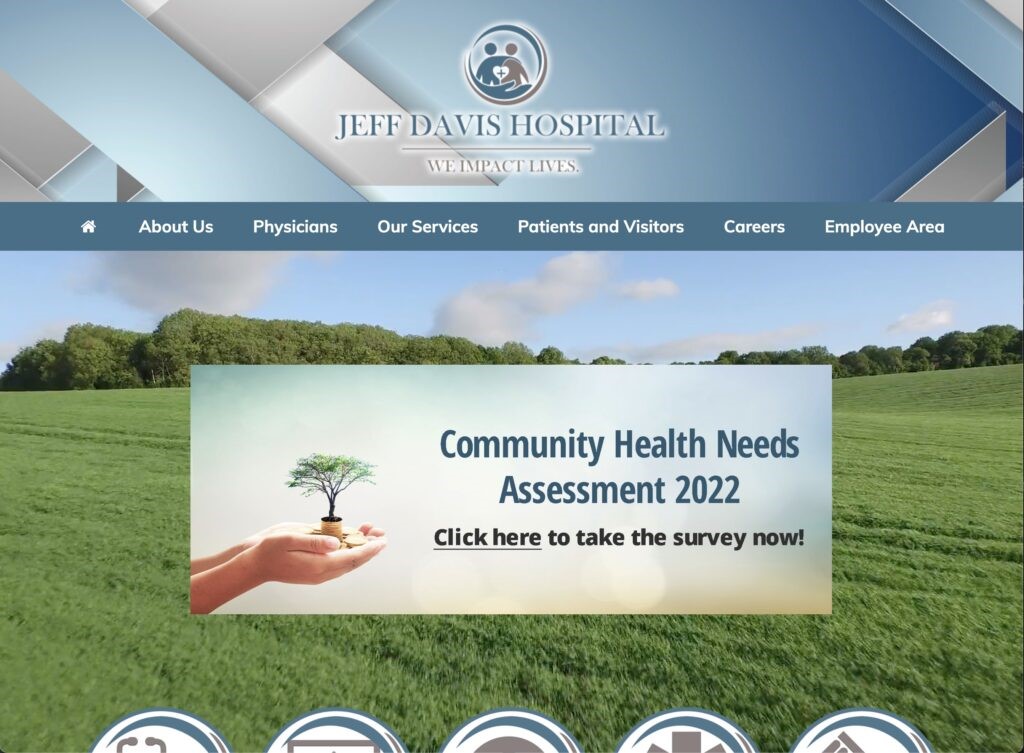
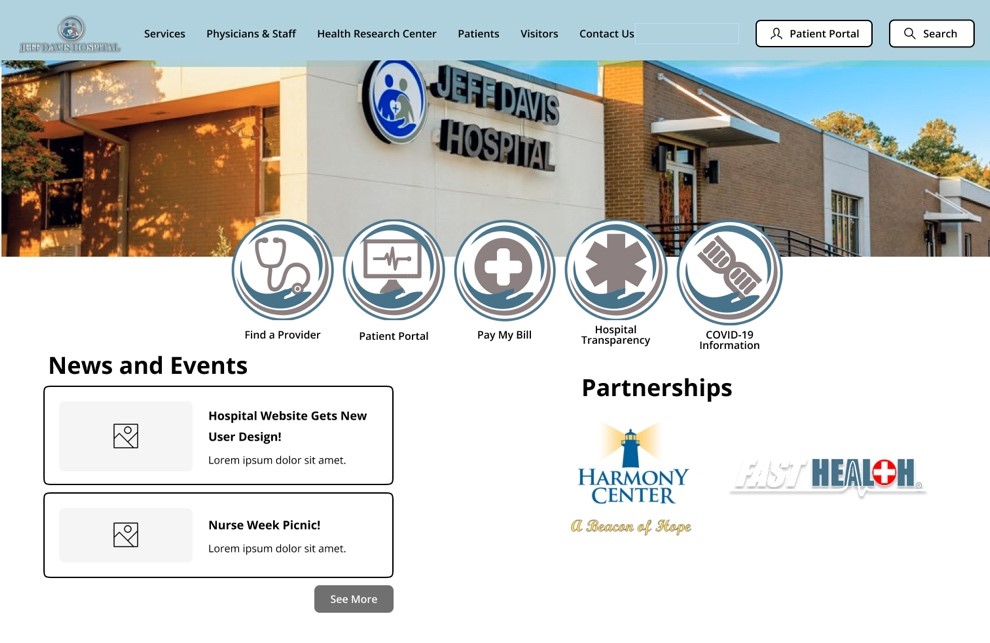
The Healthcare Group user tested the Jeff Davis Hospital (JDH) website, shown in Figure 1, through a comprehensive scenario of an individual seeking healthcare services for their family member. Violating major heuristics issues around consistency, standards, error prevention, efficiency and minimalist design, this site needed major redesign in content organization to merge its disjointed brand or legacy sites (Nielsen, 2020). In our group’s first redesign, we approached the site’s navigation by restructuring the site map, reimplementing search, and visualizing a native implementation of their Health Research Center. Wireframes were assembled in Figma Design and Figjam using Estefanía Montaña’s (n.d.) Easy-Peasy Wireframe Kit and colors matching JDH’s theme.
Figure 1. Production Homepage (Jeff Davis Hospital, 2022)
Proposed Re-design#1: Sitemap, Homepage, and Persistent Search
Logo is home page link.
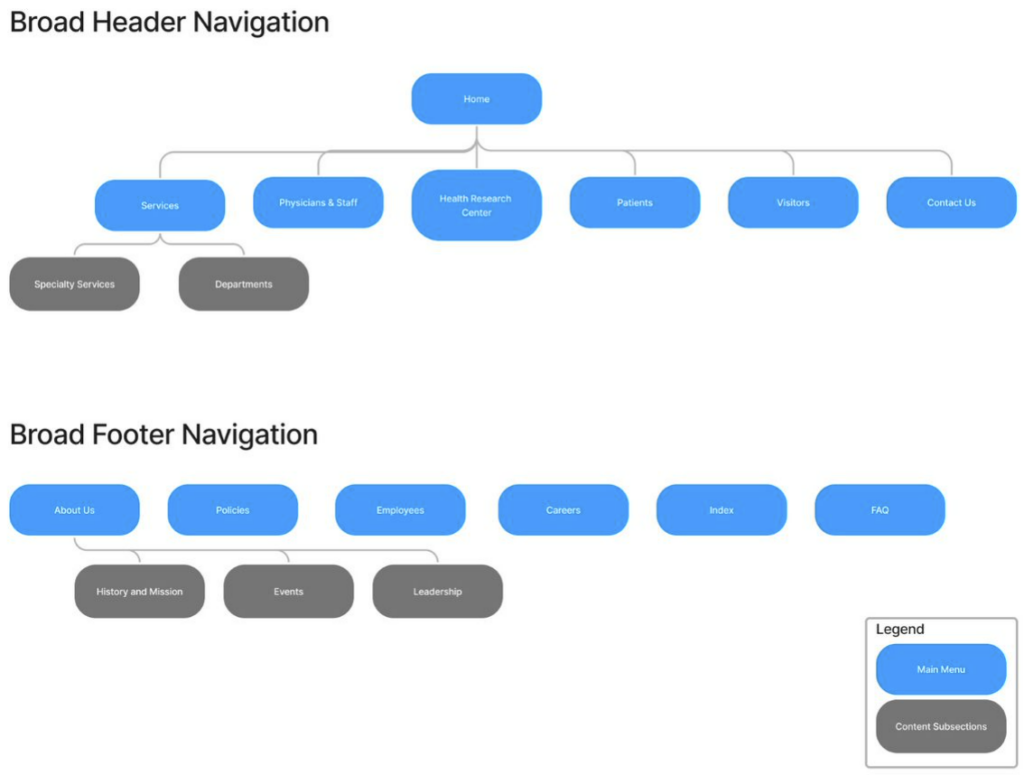
Sitemap is reorganized to focus on logical pathways to complete the user tasks. Sections like About Uss, Employees, and Policies were moved to the footer to deprioritize them.
Note that we will perform card sorting internally or with the class in the second iteration to improve the navigation.
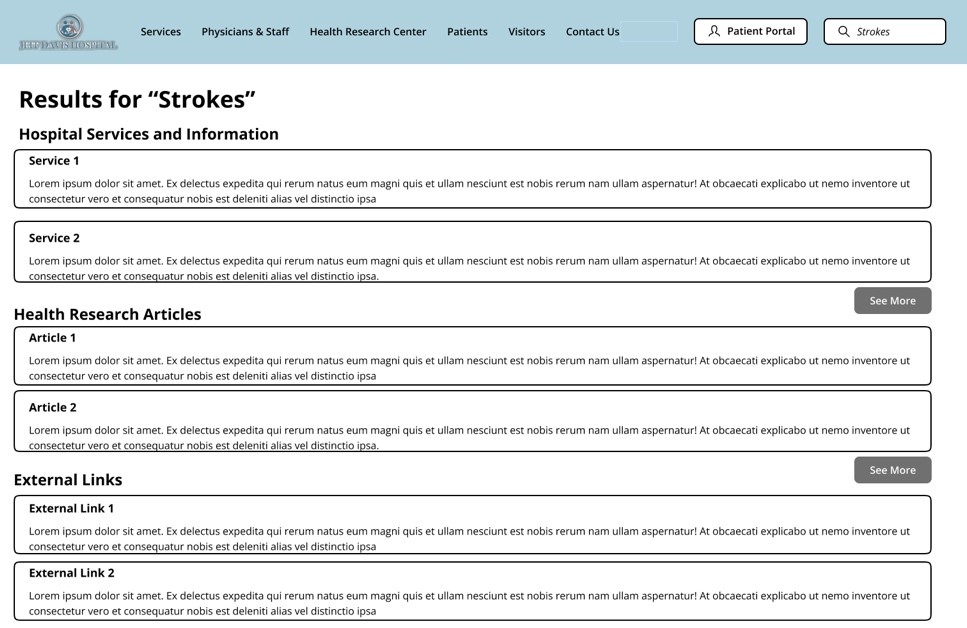
Search bar is persistent and references Services, Health Research Articles, and External Links as separate sections in results
Homepage – Static interface because users didn’t like moving images or menus
Homepage – Partnership links to brands so that they are visible but separate from the Navigation terminology
See Nielsen’s Menu Design Article by Whitenton in References as a citation use.
Figure 2. Sitemap
Figure 3. Homepage
Figure 4. Search Results Page
Design Rationale
Sitemap
As a crucial part of our group’s iterative redesign of the JDH website, our focus immediately began with the landing page of the site to address numerous navigational and content organization issues that plagued our users during testing. As stated previously, the current website design violates numerous usability heuristics, and the landing page contains more than its fair share. Our group completely re-hauled the design through embracing a more minimalist aesthetic by eliminating unnecessary duplications of navigational options for content that presented no descriptive text and nonstandard language, while maintaining highly visible navigational links to the most used features of the website. We removed unnecessary imagery, the motion sickness-inducing video background, and outdated and unorganized content links.
Homepage
Additionally, our group made significant modifications to how the menu options and content are organized. We split the patient and visitor options, while combining physicians and employees. We moved some content and options to a separate footer option bar. Our group also removed the drop-down menu options and replaced them with subpages that allow for an improved navigational and information seeking experience by presenting options with supplemental descriptive text and images to avoid confusion over terminology or naming conventions by providing the user with the context they need to understand the option before they select it. By implementing a logical sitemap navigational architecture with meaningfully organized options and content, many of the design failures of the current website that we identified during testing can be corrected.
Persistent Search
Another major redesign element we introduced is the persistent search bar in the top right corner of every page on the website. Currently, a search bar is available on the site, but only if you scale the page just right; even then, selecting the magnifying glass icon only opens another search bar with another icon next to it. We have resolved this glaring issue by anchoring the search bar in a fixed location regardless of scale. What’s more, our group optimized the search results page by removing advertisements and externally promoted content and presented results in an organized precedence that will greatly improve the user experience of this feature
Proposed Re-design#2:Services Page
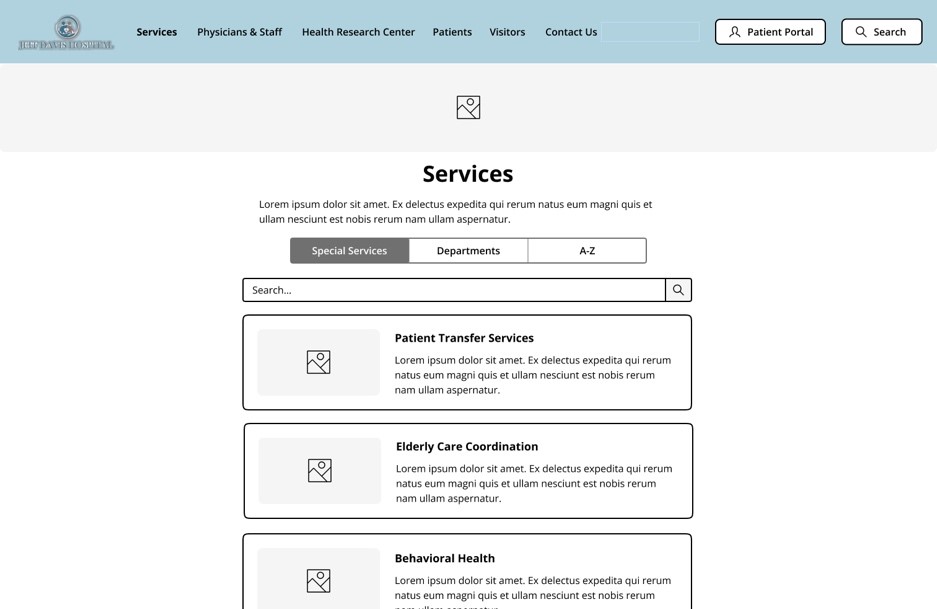
Reorganized into respective Special Services (involving more than one department) and Department Sections as their own separate tabs instead of dropdown submenus. This helps with User responsive design too.
Services named by their function rather than by brands like Swing-Bed and Harmony Center
Figure 5. Services Webpage
Design Rationale
The original design of the Jeff Davis Hospital site displays a conjunction of listed services under the “Our services” widget. The services listed under “Our services” displays all the care teams and departments offered by the Jeff Davis Hospital, the issue found with this interface design includes the inaccessibility of design for users. When users are attempting to select a service on the site the pop up of the widget does not withstand longer than a few seconds which presents a design that is not as simple or efficient to use for users which thus inhibits the goals of effective user design. To experiment with improving the JDH site’s current design we removed the service list from the main page drop down menu, footer options, and on the main page tiles. We replaced the service list drop down with a subpage directory for all services provided available with search bar, department organizational listing, and listed them alphabetically by service name. On the iterative design we are recommending, the services are listed with descriptive text and imagery to avoid confusion over terminology or naming conventions while also aiming to make finding Patient Transfer Services and Elderly Care Coordination simpler and more efficient. The information shown on each respective services page would be transferred to the respected services that they currently fall under on the JDH site as it is because the information listed helps in remaining informed on the services, but the formatting if the information presented would list the contact personnel first and at the end of the page. The information would be formatted in the middle of the page.
Proposed Re-design#3: Incorporated Health Research Center Knowledgebase
User Observation – Unappealing and Confusing FastHealth Site
User Observation – Confusing Linkage to External Sites and FastNurse Branding
Cite Cleveland Clinic as a derived example of the knowledgebase – See their Health Library
Content stays on the website and stays consistent with the Jeff Davis Theme
Adding external links to the bottom keeps the reputable resources from FastHealth
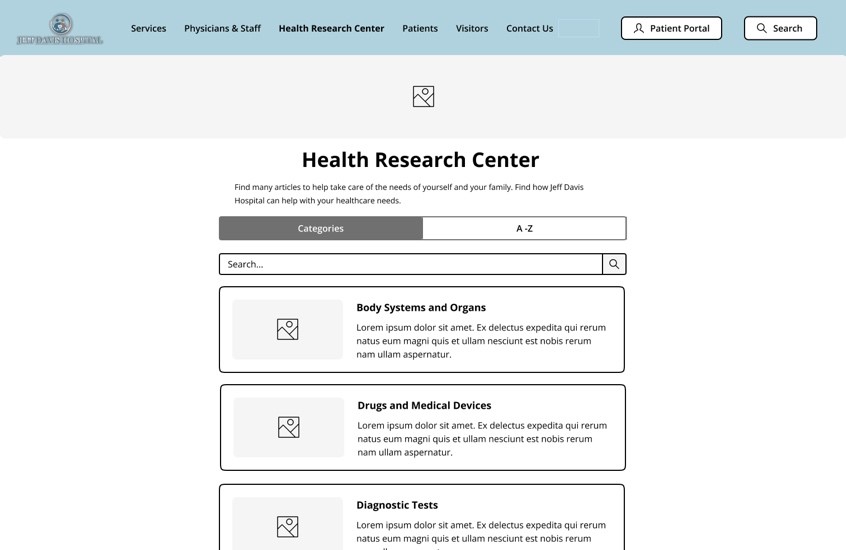
Figure 6. Health Research Center
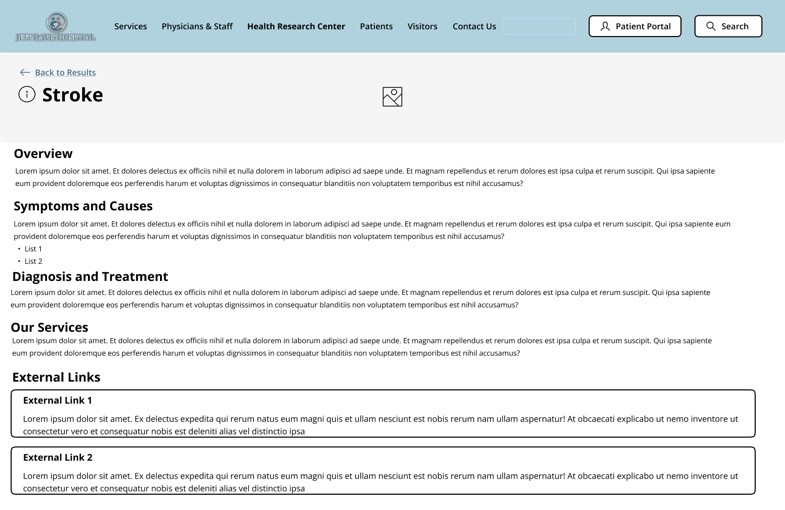
Figure 7. Health Research Article – Stroke
Design Rationale
Health Research Center
As referenced in our group’s representative user tasks, FastHealth stroke-related information proved a difficult endeavor for our users to successfully navigate. Therefore, we are proposing incorporating FastHealth’s interface into the JDH ‘Health Research Center’ webpage like Figure 6. We conducted benchmark tests and found that Cleveland Clinic is suitable to emulate a portion of its health center knowledgebase interface for this re-designed webpage. Namely, sectioning the webpage’s ‘Search‘ and “Browse A-Z‘ components. However, our re-design will swap “Search” for “Categories” since the naming convention and its presented components in Figure 6 will make searching for relevant health information better structured. This re-design will include a search bar to address additional users’ preferences for information searches. These solutions make it easier for users to quickly retrieve relevant health information.
Health Research Article
Additionally, our representative user tests identified usability flaws with efficiently researching stroke-related information concerning FastHealth’s presentation of its links. To address these flaws, JDH health research articles (as shown in Figure 7) will be re-designed so that content can remain on the JDH website without disorienting users, staying consistent with the JDH minimalistic aesthetic. The articles will provide key sections that efficiently address our user’s health information needs. Relevant external links found on FastHealth regarding chosen health-related information will be included on this webpage as well. These proposed changes will reduce usability flaws related to the current site’s lack of consistency, confusing navigation, and abundance of information noise.
References
Health Library. Cleveland Clinic. (n.d.). Retrieved November 15, 2022, from https://my.clevelandclinic.org/health
Jeff Davis Hospital/fasthealth corporation (Hazlehurst, Georgia – jeff davis county). (2022). Jeff Davis Hospital/FastHealth Corporation.http://www.jeffdavisfasthealth.com/
Montaña, E. (n.d.). Easy-Peasy Wireframe Kit. Figma. https://www.figma.com/community/file/989274600796773962
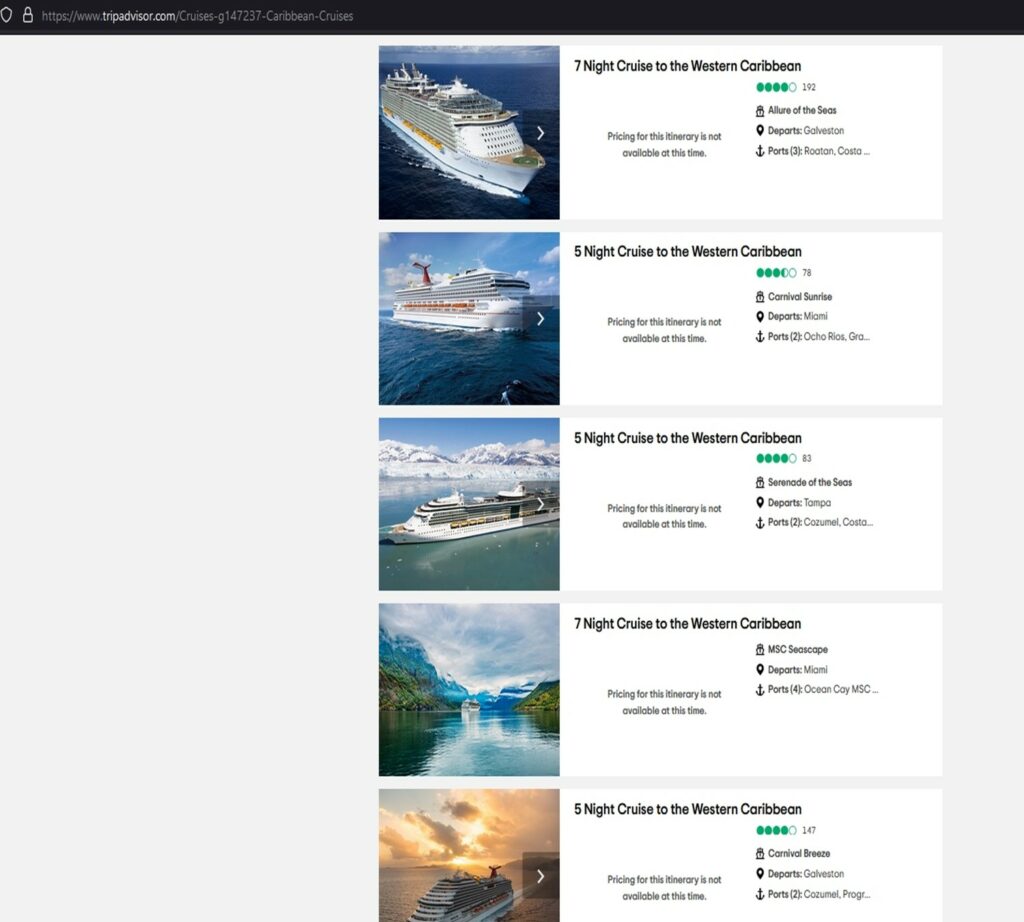
The first issue that our users encountered when doing the task of searching for a cruise within the $400 price range was that the search result included a lot of “pricing for this itinerary is not available at this time” entries. It showed up in the search results after the “price range filter” was applied. We found that the issue was caused by how the sorting was set; it was defaulted to “best value”. This is a violation of Neilsen’s principle of consistency and standards because the term “best value” is subjective, unlike “best price,” which is universally understood. The results with the “best value” included unavailable cruises that weren’t aligned with what users wanted to see. As such, this violates Neilsen’s aesthetic and minimalistic design principles, which provided irrelevant information on cruises that were not available. This feature also violates Neilsen’s visibility of system status principle because even when the user adds a new filter, the search results are still sorted by the “best value” deals, which continue to show the unavailable cruises. This negatively impacted the user’s experience because it added no value to their search results. The default sorting made the results unclear to the user.
First Issue – Unavailable Cruise Search Result
Recommendations
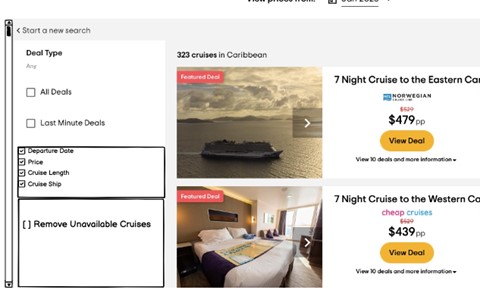
The first proposed solution is to provide the ability for end users to remove cruises that are unavailable. This can be accomplished by including a filter option to remove any cruises that are not available. The filter will be added on the left side of the page with a box that can be checked or unchecked. The filter gives the user control over the search results, allowing them to remove or keep cruises with “pricing for this itinerary is unavailable”.
Secondly, the default sorting by “best value” is hard to understand and should be removed. The default sorting should be logical and clearly related to the filter applied to the user’s search. If they are searching by price range, it should be sorted logically by price from the lowest to the highest value, or vice versa. It makes it easy for the user to understand what is going on if the sorting reflects the filter being applied. The criteria used for sorting should be transparent and allow the user to have more control over their results. To easily find the “sort by” option, it should be moved to the left side of the result page. For added benefit, this option should remain in place as the user scrolls through the results.
First Issue – Recommendation
Second Issue
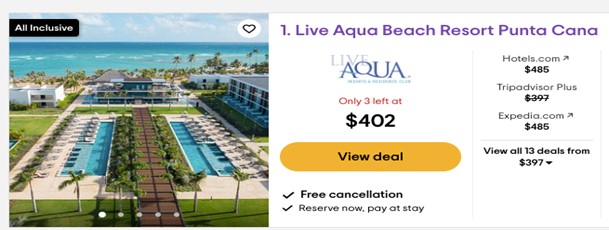
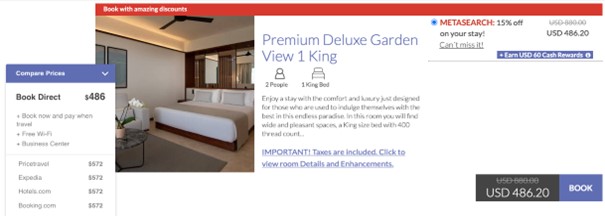
Secondly, transparency of pricing was an issue noted by many of the users that we evaluated. The price originally presented was significantly less than the final price of the resort, activity, etc. This was frustrating for many of the users, who thought they had found a steal of a deal and wasted their time going through the booking process only to find the final price significantly higher than the initial quote. This violates Neilsen’s principle of visibility of system status because the actual price of the hotel is not what it is visible to the user. This also violates Neilsen’s principle of consistency and standards because the price shown in one page is different when transferred to the provider’s webpage.
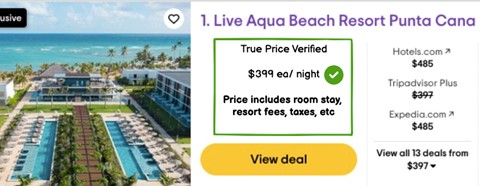
Second Issue – Deal PricingSecond Issue – Actual Pricing
Recommendations
There should be transparency regarding pricing. During browsing, it needs to show the actual price including taxes before getting to the end of the page. Our recommendation is to have a “True Price” feature that includes all fees, taxes, etc. up front. The proposed transparency enhances trust, ease of use, and a less stressful experience for the user. By reducing the stress of the booking process, we’re confident we’ll have more return customers. By adding the “True Price” to every single feature advertised on TripAdvisor, we further enhance the consistency and standards of the website design.
The website our group chose to use in our testing is Tripadvisor. Tripadvisor is a travel website where users can plan out their trip(s) and book all travel-related services. Users can search for hotels, vacation rentals, restaurants, cruises, flights, and more. The website also acts as a travel blog and posts different articles related to travel and specific destinations. Tripadvisor is a unique travel website because it allows users to look at different activities, restaurants, places, etc. and it links to the booking sites so you can accomplish all travel tasks from one website.
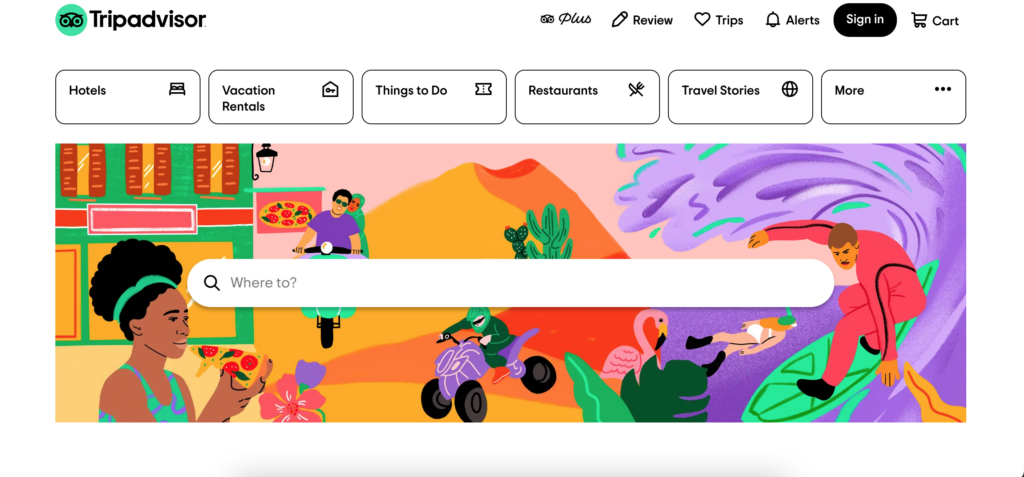
Tripadvisor Homepage
The User
When searching for a user for this test I tried to stick as closely to our group tester’s characteristics as possible. Our group had created a user who was 42 years old, female, with three children under the age of twelve living in the Miami metropolitan area.
The user I chose to test in this scenario was a 51-year-old female with three adult children in their mid-twenties. This user lives in South Florida and has lived there her entire life. The user has worked in retail for the past 15 years and does not have the strongest computer literacy. This user has been on a few cruises but has not used Tripadvisor to book or plan any trip before.
For this testing scenario, the user will be booking a cruise for four (herself and her three children) for the week of Thanksgiving since they all will be off work. The budget for the trip is a maximum of $500 per person and for a medium length trip (3-5 days). The destination is flexible as long as it is somewhere in the Carribean. The user would also like to part take in one excursion at one of the ports.
The User Testing Method
The testing method I chose to use was the “Think Aloud” approach. I was unable to accomplish this testing in person so I completed this assignment via FaceTime. Since I was unable to be physically present in the same room as the user it created some obstacles that would not be present if this testing took place in person. For instance, I was unable to see how the user tracked their mouse across the webpage which could be useful in how the user interacts with the website. For the tasks, I had the user talk aloud about what she was was doing and any thoughts or opinions she had while she completed each task.
The Tasks
The user was relatively similar to the group user we had created so only one of the tasks had to be modified. The original tasks were as followed:
Original Task 1: Find a cruise when the kids are on break from school and taking in consideration of hurricane season and to stay within the vacation budget.
Original Task 2: Pick a cruise that stops in multiple ports.
Original Task 3: Find activities offered in each port stop.
The tasks I chose to test for this user are very similar but there are slight modifications.
Task 1: Find a cruise during Thanksgiving break that goes to the Carribean and stay within the vacation budget of a maximum of $500 per person.
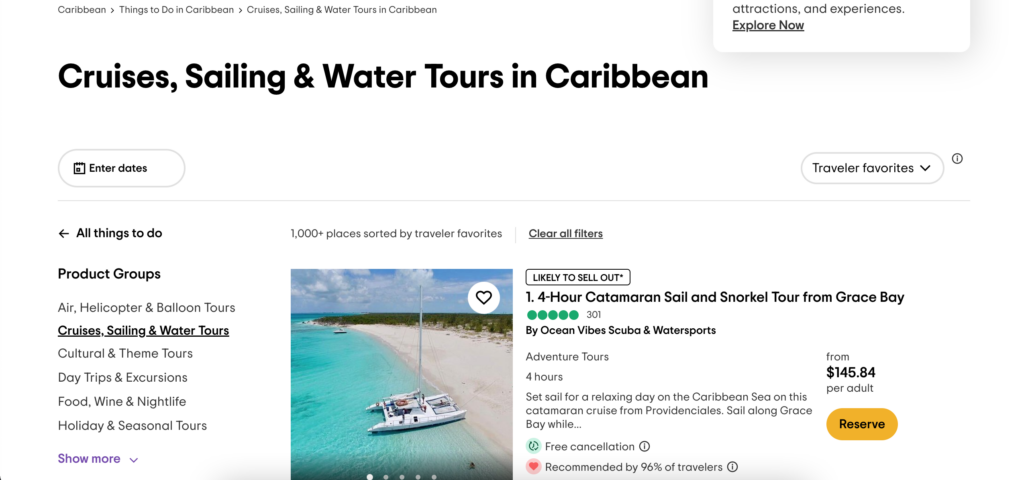
For this task I had my user start on the Tripadvisor homepage. I had the user say out loud what she was doing and I copied exactly what she did so I could provide the screenshots below. The first thing the user did was to type “Caribean cruise” into the search bar located on the homepage. This returned a result of cruises, sailing, and water tours that take place in the Caribean but not a cruise to the Carribean. The user was confused about this result when it popped up.
Cruises, Sailing & Water Tours in Caribbean results webpage
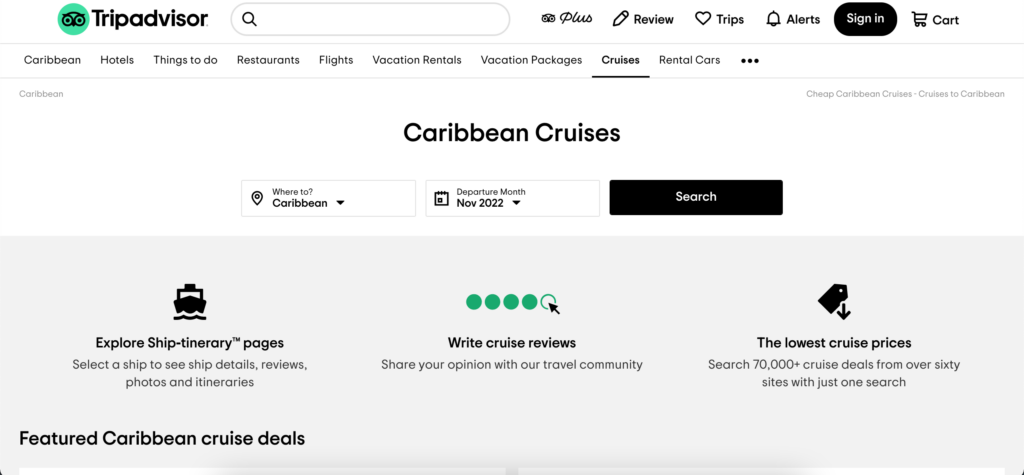
The next thing the user did was to search this results page to see if there was a link anywhere that would take her to the ‘cruise’ page she was expecting. After, exploring the page the user noticed a link to ‘Cruises’ in the navigation bar and she clicked on that to take her to that webpage.
Navigation barCaribbean Cruises webpage
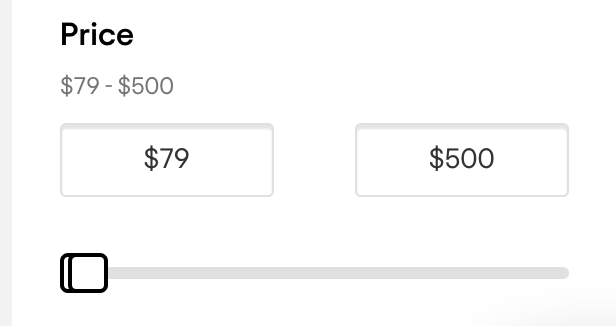
The user clicked search on the above webpage which returned a bunch of cruise results for the Caribbean during the month of November. The user explored the page by scrolling up and down the page. That is where she found she could put in her maximum budget to filter the results for the cruises.
Price filter
After she filtered the result I told her to pause what she was doing and told her we would be moving onto the second task.
Task 2: Find a midlength cruise that is around 3-5 days (this length of cruise will stop in at least one port).
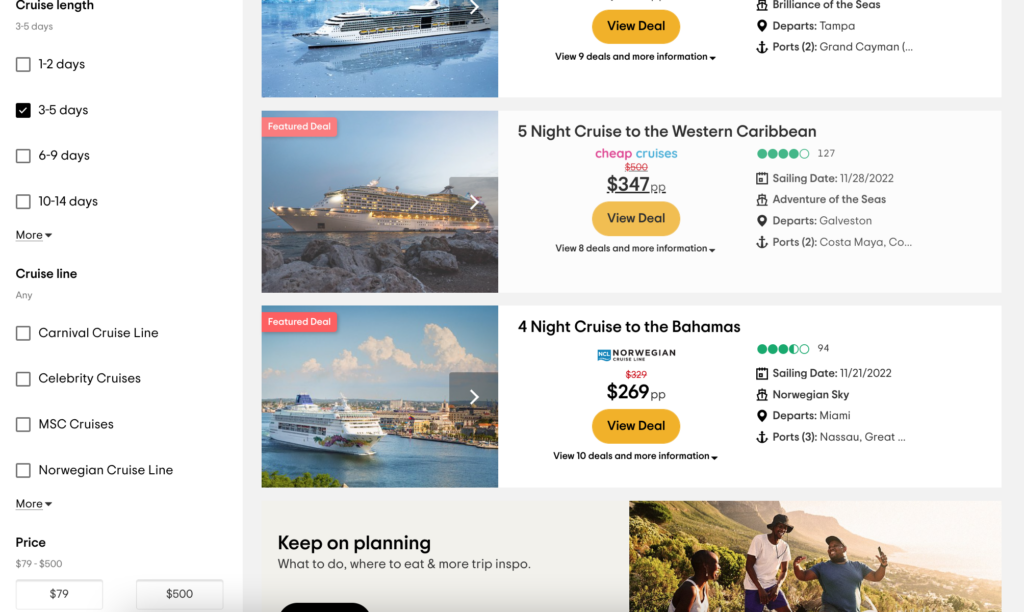
I had the user complete this task on the webpage she was already on since that seemed to be the logical way to filter down the results instead of starting from scratch. The user had explored the webpage previously so she found the ‘Cruise length’ filter rather quickly and without any problems.
Cruise length filter
Task 3: Find an excursion or activity to participate in at one of the ports
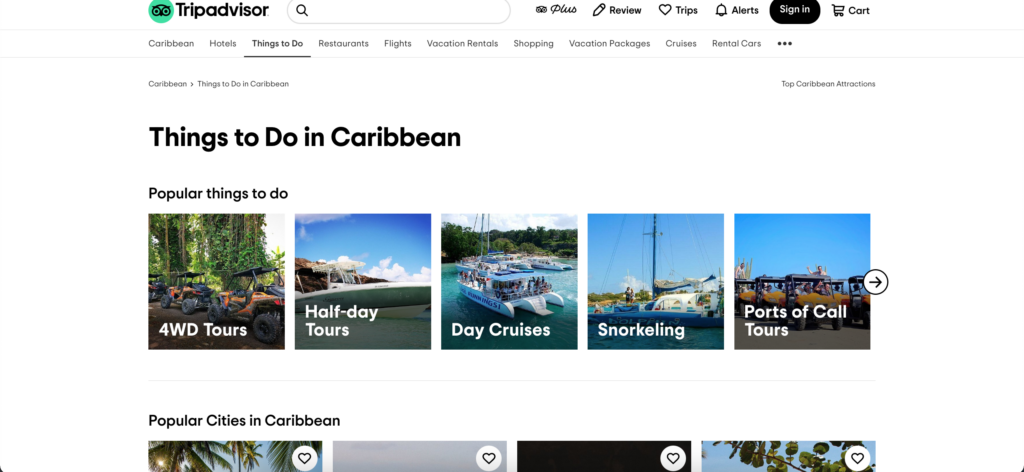
For the third task the user had to find an excursion/activity to participate in. The first thing the user did was to scroll down the page to see if there was an option regarding any excursions or activites. The user did not find anything this way so she continued back to the top of the page. From there she noticed the ‘Things to do’ link at the top of the webpage. She decided to click on that so she could explore that page. From there it took her to the wbpage with different things to do in the Caribbean. She then compared the attractions to the cruise ports.
Things to Do in Caribbean
Recommendations
I asked my user at the end of the testing what she would change about the website if she could. The first thing she recommended was that when searching “cruise Caribbean” that it returned more options that just cruises you can take from the Caribbean. For instance, return those results and also a section for regular cruises to the Caribbean. The second recommendation the user had was when searching for a cruise it would be nice to search by week instead of being forced to search for the whole month. Another recommendation would be to have an option for the excursions/activities located on the same page or highlighted that it exists somewhere on the cruise results page.
Our group selected the ticket purchasing system to redesign. We agreed that this is one of the most important features of the site, and one that has ample room for improvement. Many users found the ticket buying process arduous and were disoriented by the Trip Advisor widget, the initial pop-up ticket window that seemed to confuse a few participants during some user tests. This pop-up window takes the user to a smaller window with a lot of initial information. It was not obvious to all users what they needed to do to complete their goal of buying a ticket. Each step had barriers to the participants’ understandings of what they needed to do next. Overall, this adds to the cognitive load a user may experience at a time while decisions are being made. As soon as they completed one step, the next step caused them to reorient themselves all over again.
Instead of a pop-up window, we propose that the Norman Rockwell Museum (NRM) implements a proprietary purchasing feature within its own website to maintain uniformity, control, and consistent aesthetics. By standardizing the checkout page with the rest of the website, there is a hope that the user will feel more comfortable using it. Through this, our redesign aims to decrease confusion and cognitive load on the user during the ticket buying process, making the experience more user-friendly. Our proposed redesign will simplify the process of buying tickets through reducing the ticket selection to a single page with all discount options placed into a single drop down per ticket. We’ve also combined the general museum visit and the “visit + studio tour” options by adding a section on the ticket buying page where a user can opt in to the tour and select their desired tour time underneath this option. Below, we have included a prototype for our proposed redesign of the NRM’s ticket purchasing page. Individual elements have annotations that provide further details beneath the prototype. While creating this prototype, the following ideas guided us:
The pop-up ticket interface should be removed and replaced. This interface caused a host of problems for users. By replacing this with a set of pages that are standard across most ecommerce websites, users will be more familiar and comfortable with navigating the ticketing process.
Simplify the ticket types. The current ticketing system has multiple locations to select ticket types, whether that is just a museum visit or a “visit + studio tour”, an adult or child ticket, and then a drop down for additional ticket discounts. Streamlining how a user can purchase their desired ticket means that potential confusion regarding the next step(s) can be greatly reduced.
A standardized checkout page. The pop-up box that is currently on the NRM’s website is unique in its formatting and interface compared with the rest of the website. By replacing it with more commonly found formats, forms, layouts, and interfaces the user will feel more comfortable utilizing them.
Inclusive design. Our redesign considers that many users will need a design that enables users of all backgrounds and various ability levels. Exclusive designs create usability issues when a user does not fit a specific circumstance, but an interface is able to reduce these usability issues through inclusive designs that include a flexible display that is able to be accessed by as many users as possible.
Our ticketing page brings all variables for your ticket onto a single page, where previously they existed over two or more pages. The calendar is now prominently displayed on the ticket selection page, this leads the user through a very clear process, starting with selecting the day they want to to come, the number of tickets they need, what types of tickets, and finally whether they’d like a studio tour.
This dropdown displays a list of all ticket types available and replaces the two separate sections for ticket type and ticket discount. All prices are clearly displayed next to each type so the user can quickly browse all categories and select the most affordable type that applies to them. The most common ticket types are bolded and placed on top of the list to expedite selection for the user. Additionally, these dropdowns populate as additional tickets are added in a 1:1 ratio, making it explicit to the user what discounts are being applied to which tickets.
This section makes adding a studio tour for the group of tickets very simple for the user, with two clicks to opt-in and select a time. Previously this was achieved on a different page and prompted an entirely different set of ticket prices. On top of simplifying the process, the call-to-action and clear pricing information will hopefully increase the purchase of studio tours.
The website for this test is IGN (https://www.ign.com). The site hosts a wide variety of content related to video games and entertainment. The layout of the site is designed around a sidebar style menu setup that can be condensed to the far left of the screen to have more room for main page content.
• The User
The user for this test is a mid-30’s black male that enjoys gaming on his days off. Raised by an Army father, and with a bachelor’s degree, he is very well spoken, well-mannered, and respected by his peers and his customers. He almost exclusively games on a PlayStation 4. He is in the IT field, with over 15 years of experience, so there should be no issues with “normal” website navigation.
• The Testing Method
In the test, the “think aloud” method was used, simply due to it’s cost effectiveness. In a conference room setting, the user was provided a printed list of the three tasks to accomplish and a laptop that was open to the IGN website. The user was read the following script to help set the “motivations” behind the provide tasking:
You are just out of high school and have your first job. You enjoy gaming and are looking to purchase a game with your hard-earned money, but you want to get a good game that you can use to pass the time. The idea of spending $60 on a game that you will complete in a few hours seems like a waste of money. With this in mind, you will visit the IGN website on the laptop and perform the three tasks listed on the provided list.
• The Tasks
Task #1: Since you are looking for a good game to buy, start by finding the site’s “best games” from 2021.
Task #2: You are looking for a game that will take some time to play through, so tale a look at Zelda: Breath of the Wild and see how long it would take to complete.
Task # 3: Look through the 2021 best games list and check out the reviews to pick out a game that you would want to play.
• How the test went
Task #1
The testing was in line with what was found during the original group discussion about the website. The first words out of his mouth were “I’m looking for a search bar.”
Some of the following conversation:
“I see a magnifying glass, so I am clicking that to see if I can use that to search the site.”
This points to the real-world expectation of using the magnifying glass icon for searching.
“When I click on it, it shows games and playlists, and since I’m not trying to find a specific game, I’m checking the only other option which is Playlists. Since it shows stuff other that games, I’ll search for 2021 and see what comes up.”
This leans more to a lack of other options instead of having a choice that makes sense to the user.
“There’s a lot of stuff just called 2021, so I’ll keep scrolling. I see different ‘Favorites of 2021’ and various writers’ best of 2021, but no “IGN best of” list. Nothing shows up for ‘2021 Game of the Year’. I’m going back to the home page now.”
Already some frustration from the user, as the closest thing to a search doesn’t give him anything usable for this task.
“I’m looking under Reviews, Game Reviews…. Why does it have Movies, TV, and other stuff under Game reviews?”
Looking at what he was talking about shows that there are issues with the Reviews section. Selecting Game Reviews in the left navigation pane highlights the words ‘Game Review’ which shows an attempt to keep the user informed of where they are, but in reality, all reviews are on the same page. They filter by type by using the side navigation buttons, or the bar in the middle of the page that shows the same subjects. Oddly enough the Comics reviews option is not shown in the left-hand navigation.
Task #2
“The Playlist let me search for games, so I’ll try that. Zelda shows up on the list and I click there and go to the page and there’s the How Long to Beat on the page.”
Lessons learned from the first task were applied but may have been a more natural flow with a simple search option as well.
Task #3
“Since I couldn’t find a IGN 2021 Games of the year list, I’ll just try to find a game I might like.”
He clicks Discover and finds a IGN Best Picks section and starts there. For the sake of time, he picks Call of Duty: Modern Warfare 2. As he looks through all the reviews, he comments on the lack of pictures by each.
• The Recommendations
The absolute first change that the website needs is a well-defined search function that the user cannot miss. In the testing, an uncomfortable amount of time passed as the test user scrolled and clicked through various menu options, until he finally gave up and clicked on the only thing with a magnifying glass by it. This shows that the symbol of a magnifying glass is universally understood to be associated with some form of search functionality. Having a search bar with the magnifying glass icon by it would create the match between system and real-world expectations.
A second change would be in the best Games list. It should have had a small picture by each review, just for consistency. Some reviews did, but they were in the minority. That may just have been the author’s poor layout, not indicative of the entire site.
Another note is the Login/Register buttons at the bottom left of the page. There should be some addition call to action for these, such as “Click here to subscribe to our weekly email with the latest reviews and special content”. If this is connected to some website metric, it would generate additional interest form site visitors.
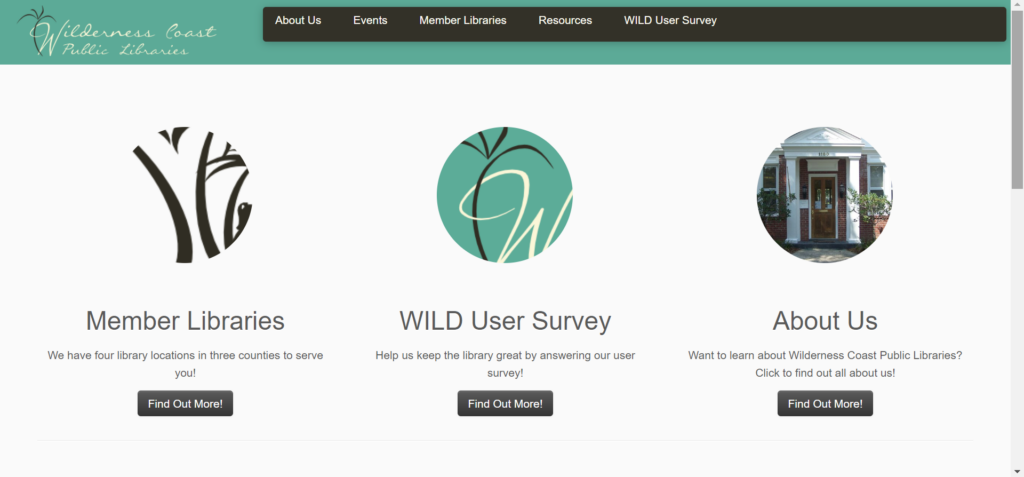
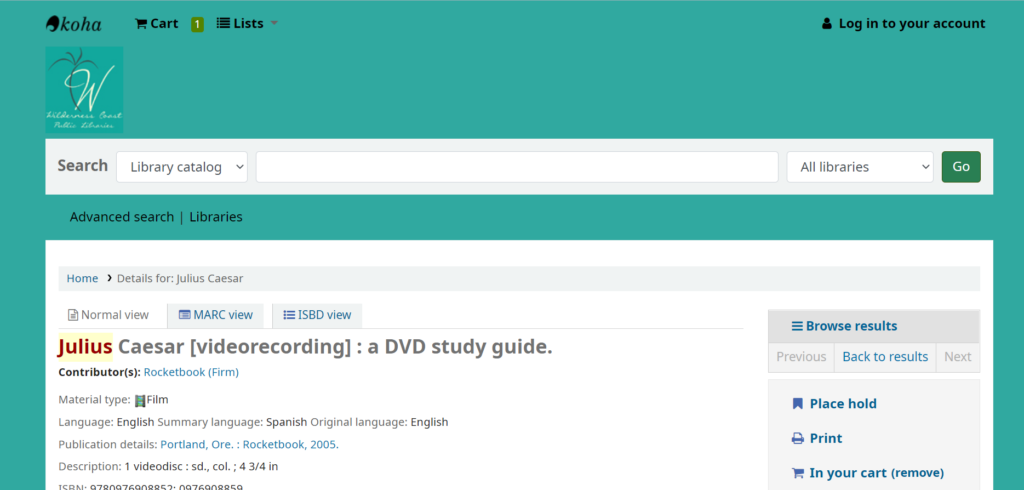
We chose the Wilderness Coast Librarysystem’s website, and chose to follow up our analysis with an emphasis on one of the 3 different library websites that are affiliated with the Wilderness Coast system, the Jefferson County Public Library website. This website is particularly interesting because it not only includes the main webpage detailing all of the info regarding the different member libraries and links to each one’s individual website (which provides a user, but it also includes a link to the main Catalog that all 4 member libraries utilize.
Persona/User
Our persona was intended to be a high school aged student who had to write an essay about Julius Caesar. Although I could not find a high school student to perform our user test, I was able to ask a college freshman to go through the website and think aloud while they navigated the page. My user had already taken college-level English and research courses, so that is a significant deviation from not only our developed user persona, but also likely from the average user of these websites in general. However, because a college-level research education is based on using a system that is (theoretically) well-made for research at a variety of levels, these sites present enough unique challenges that their intuition would not necessarily work out well for them anyway. My user claims that they are pretty comfortable looking things up on difficult to use websites, since they do that often for their job, but that they aren’t super comfortable with technology in general.
Testing Method
I chose to utilize the Think Aloud protocol, because I knew that my particular user would be comfortable giving immediate feedback as they went through, and that they would happily verbalize them. I think that it is helpful to see what they are doing in the moment and why they think they are doing it/what they think the interface wants them to do. I find it particularly interesting the way that, whilst doing a Think Aloud, people tend to anthropomorphize the interface and ascribe sentience to it (i.e. “it wants me to do XYZ”), which they then verbally react to. I have noticed that this does not happen as much with other types such as Retrospective Probing, and I think this helps us to better understand not just what a user does and why, but also how it makes them feel and why.
User Tasks
I wanted to utilize the tasks as we wrote them, since I felt like it would provide the best flow for a potential user. However, we did also have a short conversation before the test about their experiences with libraries, and spoke about the Library of Things and Seed Libraries that they’ve utilized at their own library, which influenced their user test toward the end. I did not comment on that, since I thought it was a fun addition that a student may likely need to try to find when completing a research paper.
Our tasks were as follows:
Task 1: Using the Library system, the student will locate a relevant book for their research on the death of Julius Caesar, and which library that book is located at.
Task 2 Now knowing what book to look for and what library it is at, the student will look for the available hours of that library that does not overlap with their high school schedule.
Task 3: Find information on the use of computers at the local library to complete their research paper on Julius Caesar’s death. The student will also find out how to print from the library.
User Navigation
I gave my user a list of the three tasks to complete the project, and then set them up with the main Wilderness Coast Library System website, since that is the first result that comes up on Google. She immediately hovered over each of the three options and could not decide between the Member Libraries option or the About Us option (but immediately said that the Survey seemed pointless). She decided to start with About Us, but as soon as she opened that page she said that it did not seem to be what she was looking for, so switched to the Member Libraries option from the Nav bar. She found the JCPL option and clicked on that tab, and found the carousel image header both unhelpful and nauseating. However, after she was done being annoyed about the carousel, she noted that she was excited to have found the address for the actual library she was looking for.
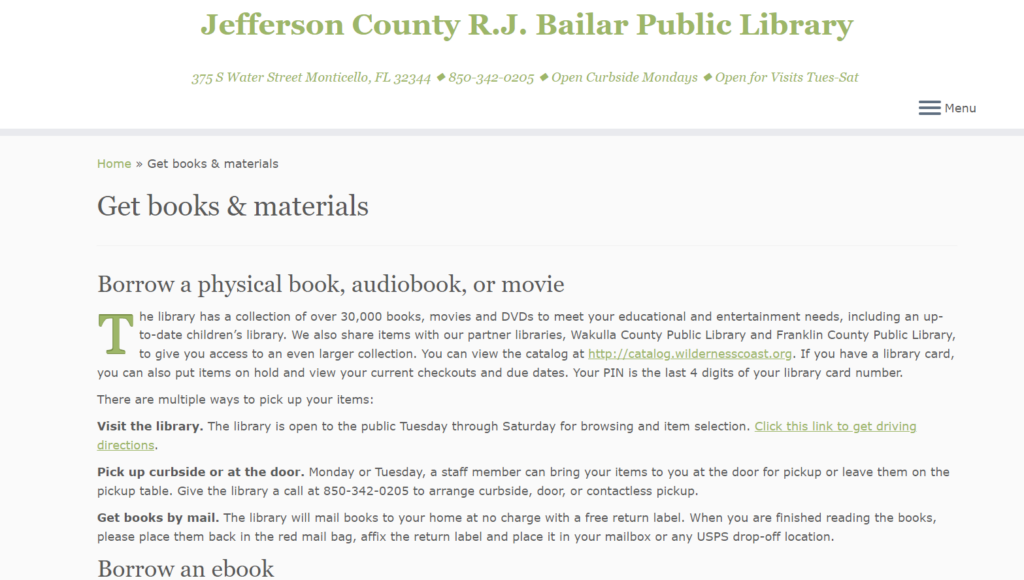
However, even though she knew where to physically go to find books, at this point she knew she needed to find the catalogue so she could actually look for books. Yet again, she was not sure which button to choose between Get Books & Materials and Discover Library Services, but “Get Books” seemed more promising so she went with that. When that page opened, she was looking for a search bar and was confused when she did not see it after scrolling up and down the page. Assuming she had landed on an “About our Services”-style page (since it was so text heavy), so went back to the Home page to get to the Services page. Realizing that it was essentially the same style of info, she clicked the “Get Books & Materials” button on the bottom right of the Services page. She skimmed the bolded headings of this page, seeing the different ways to get a book and noting that there is a way to borrow tech, which she wanted to explore (since she knew that was the third task) but decided not to because she hadn’t found the actual materials she needed to write the paper in the first place. Tucking that info away for later, she continued to search for the search bar that would allow her to find books.
After much clicking around this limited website and growing frustration, she decided to return to the Wilderness Coast landing page to see if she could find a Catalog there. She decided that the Resources item on the Nav Bar felt promising, and selected that. The first two items, WILD Catalog and WILD E-Books, called to her, and she could not decide between the two so she opened them up at new tabs. She immediately got excited by the search bar on the Catalog page, but wanted to check on the E-Books just in case; however, when she saw that they page was basically just a link to a different resource, she closed it out and continued forward with the search bar.
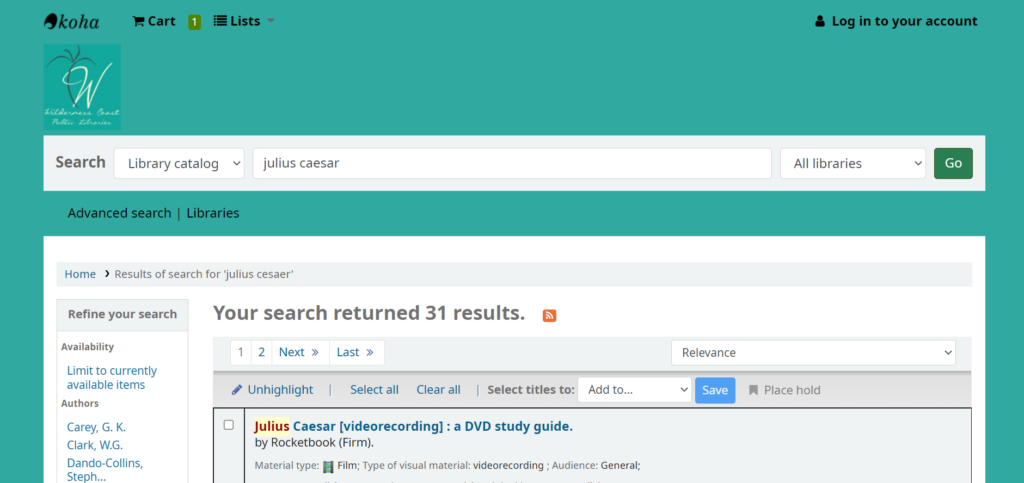
She searched for “Julius Ceasar” and was shocked to only see three results displayed. She decided to expand her search to “Rome” and decided that the 21383 results was too much. She switched to “Roman leaders” and felt that between the three Julius Ceasar books and the 550 Roman leaders resources, she could probably begin crafting a decent essay. She then went back to her search for “Julius Cesaer” and noticed that there were now 31 results instead of 3. She Googled how to spell “Caesar” and came back to the search bar and entered the name in properly, which interestingly enough still yields the 31 results.
Now that she was able to locate that they had books/videos related to the topic, she checked to see where they were offered. She just went to the first result at the top of her current search page, which was for the Videorecording/DVD study guide. She noted that it showed green at the bottom of the listed that it was available at the JCPL branch, which she was excited about. When she clicked the title to look more into the resource, she saw the menu on the right side of the page and chose Add to Cart…and was confused when nothing appeared to happen. She scrolled up to find the Cart and saw the Log In option, but never located the cart. She clicked the Log In and promptly backed out since she did not have a library card and could not log in. She tried to choose the Place Hold option and also realized that she could not since she did not have a library card.
At this point, the user noted that she needed to find out when the library was open so she could go get the resource (and sign up for a library card). She had thankfully already found the address on the JCPL site, but did not remember seeing anything about the time. She started backing out of the catalog page and ended up backing up until she was stuck on the home page and could not back up anymore. She quickly perused the site and was thankfully able to quickly find the hours for the branch closest to her, but noted that she would not have guessed to look there if she hadn’t been dumped there during her frantic backing out.
She finally decided to go back to the JCPL webpage, and thankfully noticed the hyperlink to the left of the library hours to find the JCPL link. From there she navigated back to where she remembered seeing the Borrow Technology heading, and ended up back on the Catalog by following the Tech2Go link. She realized that she would probably need a library card for that, as well, and figured that was where she should stop.
Design Recommendations
There were a number of issues that my user ran into when navigating this site, which in many ways echoed my own navigation woes and the frustration my group has identified as we’ve worked with this website. These are the biggest stand out issues to me, though, that I think would help navigability immensely.
Main Home Page
For the Wilderness Coast main page, they should forgo the About Us/Survey/Member Libraries buttons and instead have the Member Library websites (with their addresses and hours) as the main landing page. Additionally, either above or below the different member libraries, they should have the Catalog search bar. From there, the Nav Bar can help users find more About Us and Survey info on separate pages (or honestly it could all be one continuous scroll page with clearly defined sections of descending import). Doing this would save so many clicks and so much unnecessary searching.
JCPL Webpage
The JCPL website is simultaneously too much and not enough. The information it does have is overbearing and redundant, with big blocks of text with minimal contrast to help a reader skim through and quickly find what they need. At the same time, the page is incredibly sparse and does not do a good job of guiding the user to the resources they undoubtedly want to access. Again, I think making this one continuous page could be beneficial, but mostly I think the home page should have a clearly labeled link that takes the user straight to the catalog website. Additionally, it would make sense for the home page to include things like their hours and contact information. Finally, since users cannot utilize resources without a library card, the home page should have a clear space defining the procedure of signing up for a library card.
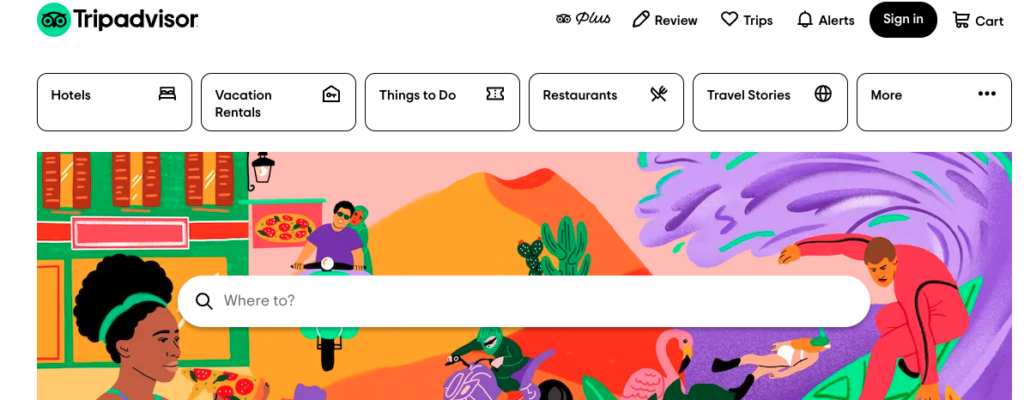
The website my team has selected to do our user testing on is TripAdvisor, which is a travel information site that offers information and booking assistance on transportation, lodging, and entertainment for vacations.
Homepage of TripAdvisor
User Characteristics
The user is a man in his 70’s with a wife and three children, all over the age of 30. He is savvy when it comes to electronics but takes longer to navigate websites. He spends less time intuitively navigating sites and more reading all the text on the page.
Testing Method
We used the think aloud testing method as we had to do the test through Zoom. My user was able to share their screen with me and verbalize their thought process as they navigated the site. By thinking out loud I was also able to note what they paid attention to on the page even if they didn’t select certain buttons.
Tasks
I provided context for the user and relayed the scenario my team drafted up where their goal is to select a cruise that fits the budget of $400 per person for their family of five that departs from Florida.
The three tasks my group drafted were:
Find a cruise when the kids are on break from school and taking in consideration of hurricane season and to stay within the vacation budget.
Pick a cruise that stops in multiple ports.
Figure out what activities are offered at the different cruise stops.
My user was able to address the first and third. However, the user couldn’t explore the second task because they already found a cruise that fit their budget and schedule. By default, the cruise was already going to stop in multiple ports. I omitted this task as most of the time spent was on the first task and we had a time limit.
Task 1
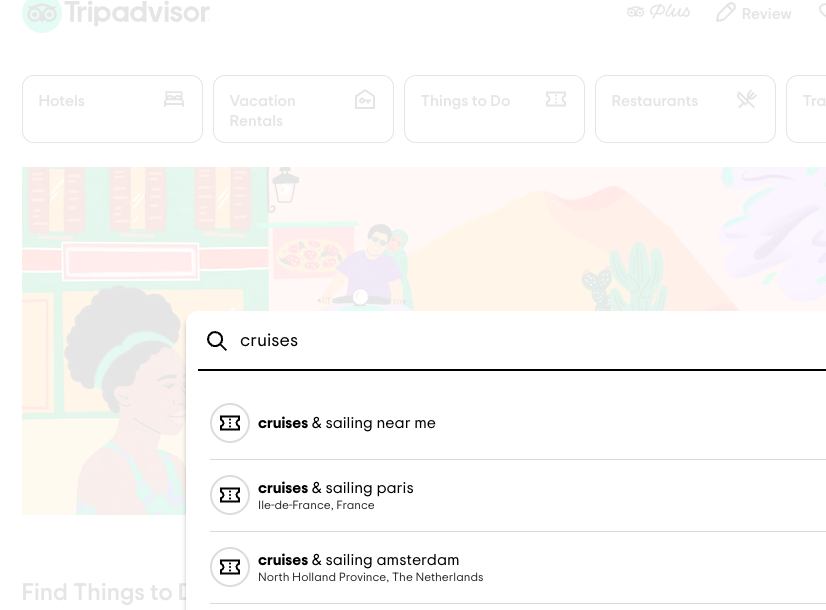
For the first task, the user went straight to the ‘Where to?’ search bar. They started to type in ‘cruise’ and was given a list of suggestions to autofill the search. They selected the first option ‘cruises & sailing’. They got a pop up about sharing their location, but they ignored it and typed in ‘cruises & sailing near Miami’.
This only provided results for local activities in Miami, so the user refined the search to ‘Sailing & Cruises Caribbean’. The user made three other attempts at nomenclature to get any search results of cruises including: ‘cruises & sailing port’, ‘cruises & sailing Fort Lauderdale’, and finally just plain ‘cruises’.
Recommended searches
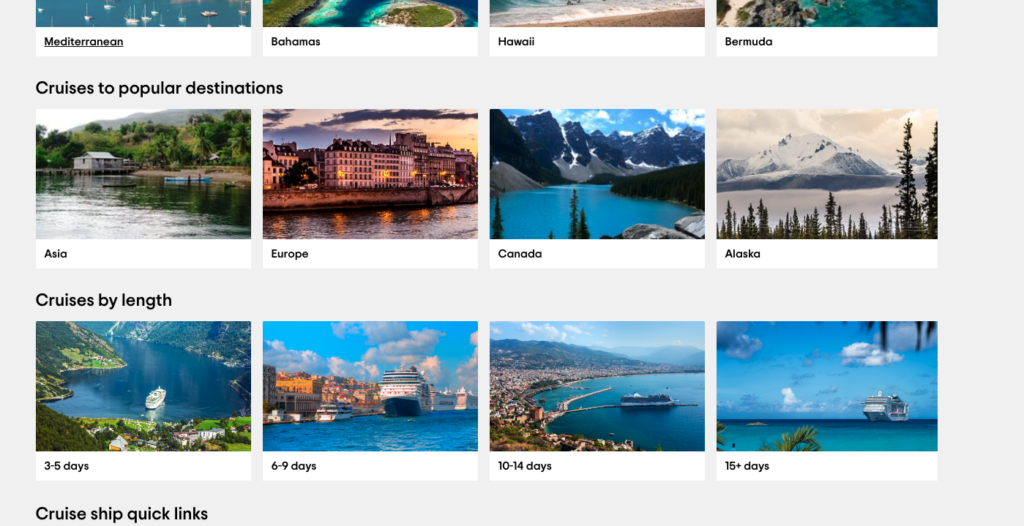
For this last search the user was finally brought to the official cruise information page. On this page, they had difficulty finding information on the ports and where to depart from. They browsed through the destination options, which still did not provide information on departure locations.
Content on the main page for cruises
The user then selected the 6-9 days option and was happy to see their first detailed list of cruise lines. This page had a list of cruises and, in small font, information of length, destination, and departure port.
The user selected a Norwegian Cruise that had a price per person within the budget and departed from Port Canaveral. When they selected the ‘book now’ button they were brought to the official Norwegian Cruises site. Here, they were first presented with a calendar to select the departure date. This is when they realized that the price for the specific date they wanted (that was on TripAdvisor) went up and the rest of the options on the calendar were too pricey. They then went back to TripAdvisor to look at other options and ended up selecting a cruise that was $200 per person, which is significantly lower than the $400 per person budget.
Just as before, they were brought to the Norwegian Cruise line site. Again, they were given a variety of pricing that didn’t match what they originally saw. They looked at the calendar and decided to click into a cruise that was around Thanksgiving for $441 per person. It turned out that this cruise came with terms and conditions where the third and fourth guests are free. Therefore, the user will pay for three guests at $441 per person (Guest one, two and five) which means their family of five would cost approximately $264 per person.
Norwegian Cruise Website User was redirected to
The user then remembered that the cruise would need to accommodate their three kids, so they went back to TripAdvisor and in the search, bar typed in the Norwegian Cruise ship, Norwegian Bliss. Even though the results showed different dates and destinations from the one they chose, the user assumed that the Norwegian Bliss was the same across the board. They then scrolled down to where the amenities are listed. They found that the cruise offers a kid’s aqua park, splash academy, game shows, laser tag, a video arcade, and a movie theatre. This is enough information for the user and they were sold.
Task 3
For the third task, the user was asked to figure out what activities were offered at the different cruise stops. For this they searched for each destination in the search bar. The results had a list of activities and a price point for each. The user scrolled through the list and rationalized that they could probably do the more expensive activities since they are saving a significant amount of money on the actual cruise tickets.
Analysis
What I learned from this process is that the user didn’t select the filters. They depended more on the search bar and liked scrolling through the results and weighing their options there. They were given the most useful information when they searched for the broadest term ‘cruises’. Because of this, I can see why they wouldn’t want to mess with filters since they know it could point them in the wrong direction just as the autofill ‘cruises & sailing’ did.
The most frustrating thing the user faced was finding out the information on TripAdvisor was false or came with terms and conditions and they only found this out by going to the actual Norwegian Cruise website. They became less trusting of information from TripAdvisor. I think this is because TripAdvisor’s results behaved more like advertisements and less of an information tool. The search results only provided the most appealing cruises but somehow were least accommodating to the user. It was obvious that TripAdvisors’ goal was to get users to go to the Norwegian Cruise website from TripAdvisor and sort out the details there.
Design Improvement
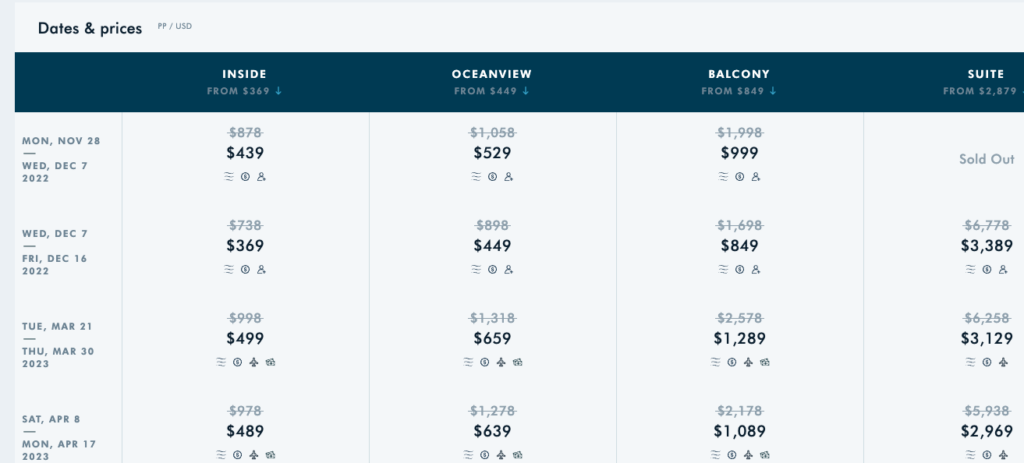
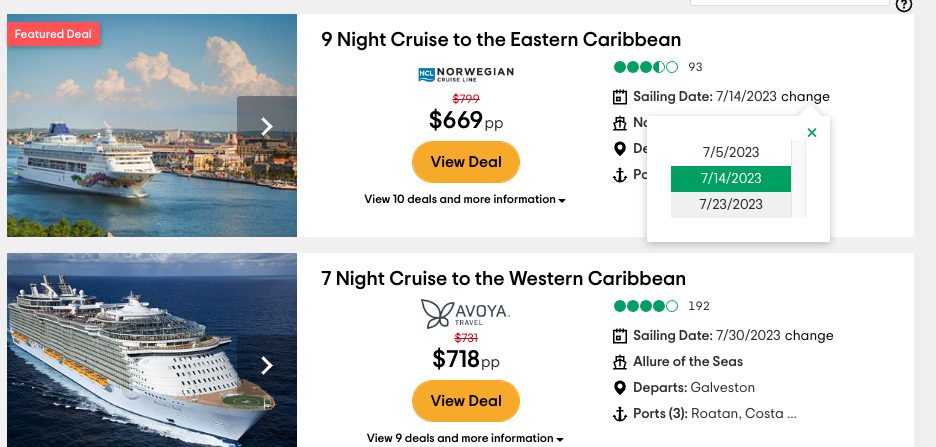
I discovered that you could view different prices and cruise dates if you click on the date of a search result. From there, you can scroll through the different date options and when a new date is selected the price is updated. This means that TripAdvisor has information on how pricing changes based on dates and should offer this upfront. They can show it in a calendar view, like Norwegian Cruise, for users to better visualize their options. They shouldn’t have users jump back and forth between TripAdvisor and the actual booking site to compare different dates, prices, and availability.
Useful information that TripAdvisor doesn’t showcase
The most frustrating obstacle was starting a search for ‘cruises’ and being recommended to search ‘cruises & sailing’ which according to TripAdvisor is a category for aquatic-related activities. To improve this, they may need to reconsider the jargon and categorization of activities that users would search by.
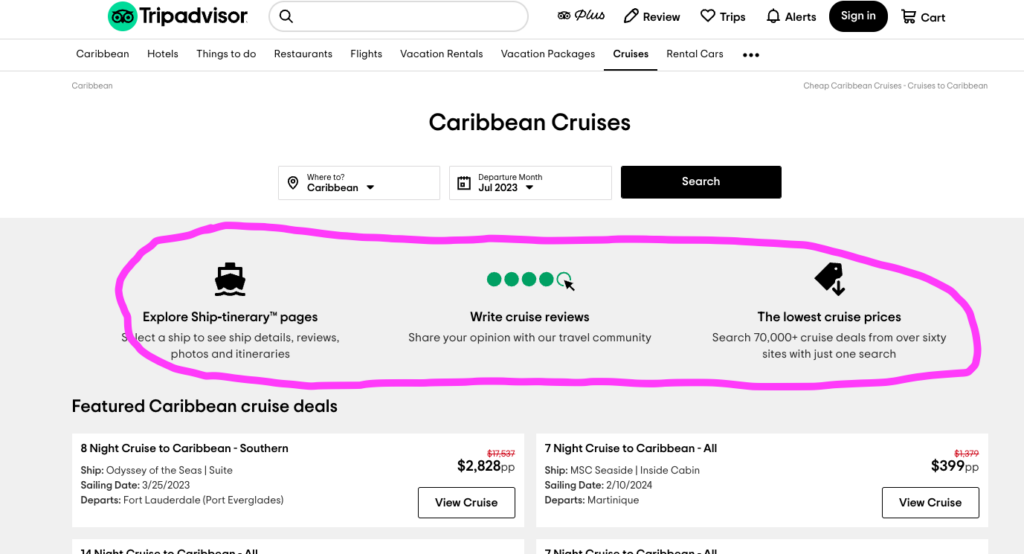
Could be replaced with more useful information to book a cruise
My last design recommendation is to replace the information near the top of the cruise page with more vital details of trip planning. In the above example, the ‘Explore Ship-itinerary pages’ only brings the user to the bottom of the page to a drop-down list of cruises. I don’t think a user would want to write a cruise review first-thing when they are looking to plan a trip. Lastly, ‘The lowest cruise prices’ isn’t hyper-linked. These are the first things you see on the cruise page, yet these points take up a lot of space without helping much. These parts can be replaced with starting points of a user’s search such as departure ports, specific dates, and pricing options. It should allow the user to be more in control of their search instead of a target for advertisements.